

|
|
|
Portlets are snapshots into CA Clarity PPM data and can consist of grids or charts.
While portlets do not replace reports, they can be considered mini-reports. A portlet page is comprised of a set of portlets or small windows of information that appear automatically for users with the appropriate access privileges. You can configure a portlet page to allow users to personalize the page as follows:
Create a portlet page to collect or display information in real time for users.
A portlet page can contain tabs or no tabs. Create one or the other depending on the amount of information that you want to display and how you want to organize the information. The following examples provide guidance for creating portlet pages without tabs and with tabs:
The new page layout varies completely from the default page layout for projects. The new layout includes a portlet page with multiple tabs and each tab groups a specific type of information about projects.
The following diagram describes how a system administrator creates a portlet page.
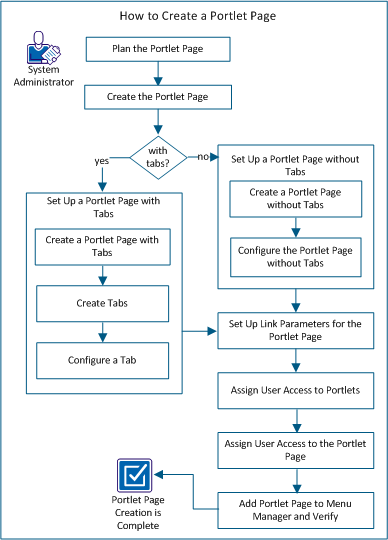
Perform these steps to create a portlet page:
| Copyright © 2012 CA. All rights reserved. | Tell Technical Publications how we can improve this information |
