

|
|
|
When you create a custom object in Studio, the following views appear for the object by default:
Configure the default views to determine how object information displays on a page. You can also configure views for the objects that are available by default.
Example: Track Project Release Information in a Retrospective
Project Managers at Forward, Inc. provide a retrospective report to upper management at the end of a project release cycle. To assist with the report, the system administrator creates a custom object named Retrospective to allow project managers to capture the information for their projects. When project managers create an instance of a retrospective, they enter the following information in the fields that the Retrospective object provides:
Going forward, upper management wants to track the length of the release cycle in the retrospective. To meet this objective, the system administrator configures the properties view for the Retrospective object to include the following new attributes:
The following diagram describes how a system administrator configures the views for an object.
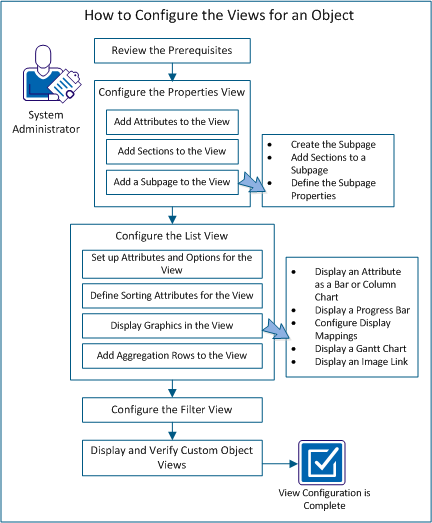
Perform these steps to configure the views for an object:
| Copyright © 2012 CA. All rights reserved. | Tell Technical Publications how we can improve this information |
