

|
|
|
Managing authentication is an important part of ensuring that unauthorized users do not gain access to system resources or sensitive information. Use the following settings to configure session and password options for all users, and to manage authentication for individual users.
Limits the number of invalid login attempts and specifies how long user sessions can be inactive before logging out users. For example, you can set a value of 3 for the number of times a user can enter an invalid login. You can also set the minutes of inactivity to 30.
Specifies the status of one or more users as Active, Inactive, or Lock. For example, a user takes a leave of absence. You can set the status to inactive so that they cannot log in and administrators do not assign the user to projects.
Specifies how often users change their passwords, the rules for password length and character combinations, and how frequently a password can be reused. For example, you can specify users can reuse a password after three other unique passwords.
You can also manage the resetting of passwords at an individual or system-wide level.
In this scenario, the term user and resource are used to describe similar concepts. A user refers to a person that logs in to the product and manipulates the user interface. A resource represents a user for whom you manage authentication. The resource can be added to projects and teams.
For example, a user named Judit logs in weekly to fill in her time sheet. Judit forgets her password and requests a reset. You reset it by updating the resource that is named Judit and contains her password information.
The following diagram describes how a system administrator configures and then manages authentication.
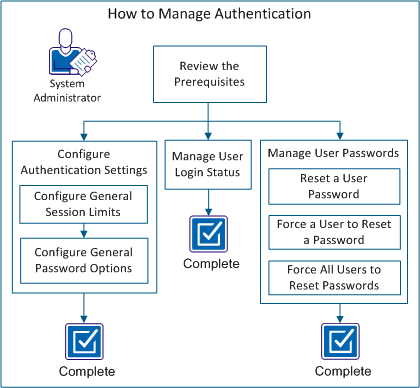
Perform these steps to manage authentication:
| Copyright © 2012 CA. All rights reserved. |
|
