Managing Tasks › Task Relationships and Dependencies
Task Relationships and Dependencies
You can view tasks relationships and dependencies within a specific project. Use the Gantt chart to view the following task dependency information:
- All top level tasks in the project including subprojects.
- Summary tasks and subprojects.
- Tasks or sub projects that have dependencies on other tasks.
- Tasks that have external project dependency.
To improve performance, child tasks are not loaded initially. They are loaded when you expand the summary task to which they belong.
To view tasks in the Gantt chart, you must have appropriate view rights to the project, such as the Project - View Tasks access right.
Read and Understand the Gantt View
The Gantt chart uses the following attributes to indicate task dependencies and relationships:
- Task name on the bars
- Colors
- Lines and arrows
- Colors
The colors of the task bars on the chart indicate schedule conditions such as critical tasks, external dependencies, and summary tasks. See the following table for examples:
|
Gantt View
|
Description
|
|

|
Blue diamond indicates milestone
|
|

|
Red diamond indicates critical milestone
|
|

|
Grey bar indicates an external dependent task
|
|

|
Blue bar indicates regular task without any sub-tasks or child tasks.
|
|

|
Light blue bar indicates summary task
|
|

|
Light gray bar indicates subproject summary task
|
|

|
Red bar indicates critical task without any dependency
|
Graphical Bars with Dependency Lines and Arrows
All tasks are represented with graphical Gantt bars. Task dependencies can be as follows:
|
Gantt Bars
|
Description
|
|

|
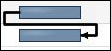
From the start of one task to the start of the next task
|
|
|
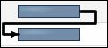
From the start of one task to the finish of the next task
|
|
|
From the finish of one task to the start of the next task
|
|

|
From the finish of one task to the finish of the next task
|
How one task connects to another task is represented by where a line is starting and ending and which way its arrow is pointing. For example:
- Lines are drawn from the start date of the task bar for start-to-start and start- to-finish dependencies.
- Lines are drawn from the finish date of the task bar for finish-to-start and finish-to-finish dependencies.
- Lines are drawn to the start date for start-to-start and finish-to-start dependencies.
- Lines are drawn to the finish date for start-to-finish and finish-to-finish dependencies.
- Lines are drawn with an arrow to show direction of the dependency.
- Tasks contained within a master-> subproject hierarchy are displayed with lines between the tasks.
- Lines are drawn between an external task and the dependent task.
- If a summary task is not expanded, the dependency lines are not displayed between its subtasks and any other tasks.
Task Bar Position, Shape, and Appearance
- External dependent tasks appear before or after the task that it has dependency with based on whether it is a predecessor or successor dependency. If the external dependency exists on multiple tasks then the external task is displayed once based on the display of the first task with which it has a dependency.
- Summary (parent) task bars have the task name on the bar.
- Child task bars do not have the task name on the bar.
- A subproject is indicated by a grey bar.
- A diamond shape at the finish date indicates a milestone task.
- A visual difference (gray task bar) indicates that the external task belongs to an external project.
- The external project name is prefixed to the external dependency task name in the chart list.
- The first summary task in the list contains project data. The Start and Finish dates reflect the project start and finish dates.
More information:
Managing Tasks
Create Task Dependencies
Display Task Relationships and Dependencies
Edit Task Dependencies
How to Manipulate the Gantt View
Finish-Start Dependency Links
Access Rights (Projects)