This section contains the following topics:
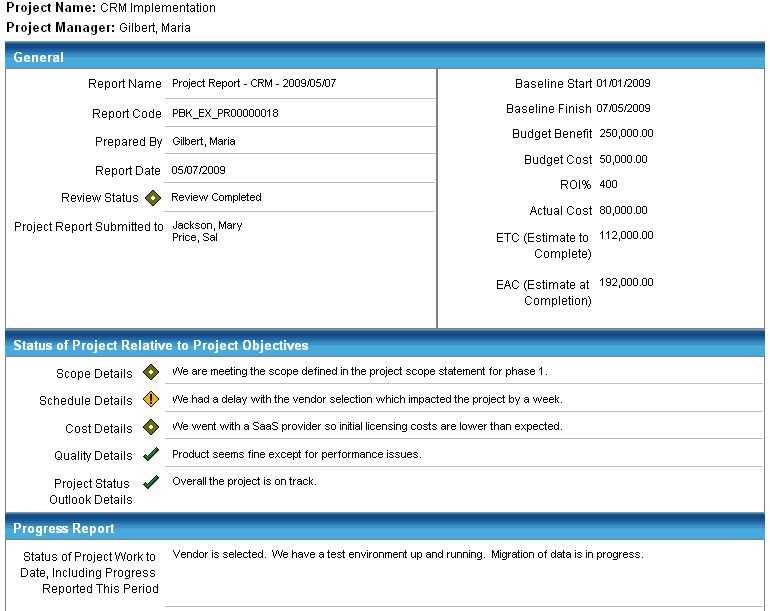
The Project Report is a Crystal report that provides a summary of the progress to date, the overall project situation and sufficient information to ask project stakeholders for a decision on what to do next with the project given the information reported. The financial information displayed on the report is from the latest project report. This allows you to view past project reports complete with their historical financial information. When used with project status review meetings, these reports provide essential means to maintain levels of communication among project stakeholders.
Indicates the OBS unit by which you want to filter this report. Click the Browse icon and select the OBS unit from the list that appears.
Indicates the project or projects whose data you want to include in this report. Click the Browse icon and select the projects from the list that appears.
Indicates the review status of the project report documents that you want to include in this report. You can select multiple statuses.
Values: New, Submitted for Review, and Review Completed
Specifies the name of the project manager for which you want to filter.
Defines the date from which to filter this report. To select a specific day, select the Specific Date option and enter a date in the text field in the mm/dd/yyyy format or click the Select Date icon to select a day from the calendar that displays. To select a relative date such as Start of Next Month, select the Relative Date option and select the relative date that applies.
Defines the date to which to filter this report. To select a specific day, select the Specific Date option and enter a date in the text field in the mm/dd/yyyy format or click the Select Date icon to select a day from the calendar that displays. To select a relative date such as Start of Next Month, select the Relative Date option and select the relative date that applies from the field's drop-down.
Many of the report fields included in this report are the same as the fields included in the project report document, such as scope status, schedule status, and cost status.
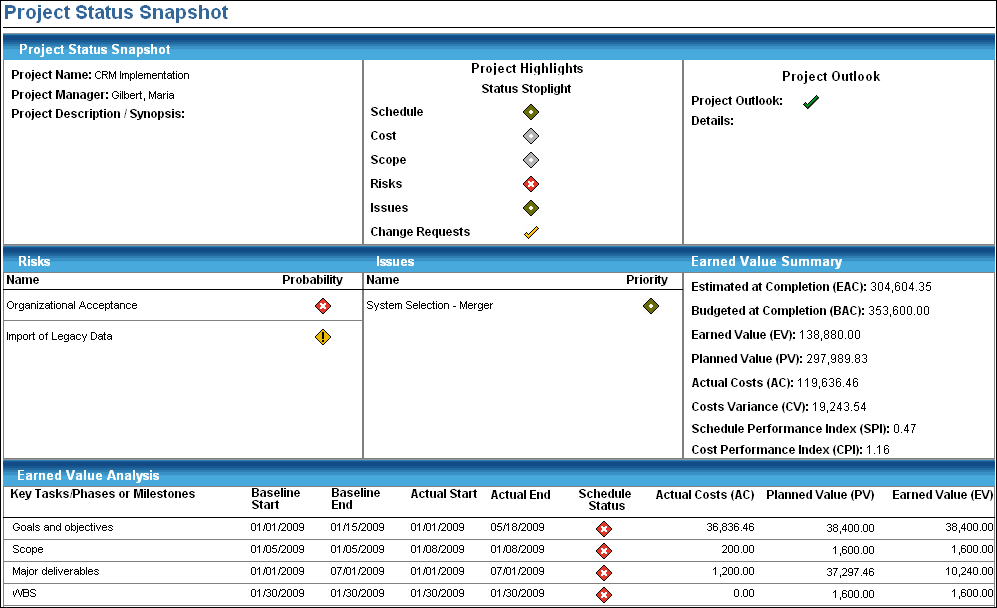
The Project Status Snapshot report is a Crystal report that allows project managers to evaluate a project in terms of up-to-date schedule and budgeted cost variance on the phase or task level. This report displays the start date, finish date, percent complete, EAC, BAC, EV, PV, AC, CV, Schedule Performance Index (SPI), and Cost Performance Index (CPI).
Members of the following access groups have access to this report:
Indicates the project or projects whose data you want to include in this report. Click the Browse icon and select the projects from the list that appears.
Specifies the name of the project manager for which to filter.
Specifies the level of detail you want to see on the report. Select the level from the drop-down.
Indicates the OBS unit by which you want to filter this report. Click the Browse icon and select the OBS unit from the list that appears.
Many of the report fields included in this report are from the latest submitted project report. The project description/synopsis is from the last submitted project charter. Other report fields are the same as the fields included in the management views, such as actual cost, earned value, and cost variance.
| Copyright © 2010 CA. All rights reserved. | Email CA Technologies about this topic |