

System Administrator Scenarios › How to Integrate CA Clarity Agile with CA Clarity PPM
How to Integrate CA Clarity Agile with CA Clarity PPM
As a system administrator, you can integrate CA Clarity Agile with CA Clarity PPM. Using this integration, product owners can create and manage requirements in an agile environment while adhering to the traditional project governing process.
The integration allows the following capabilities:
- Create and manage CA Clarity Agile products and users from CA Clarity PPM.
- Associate requirements in CA Clarity Agile with CA Clarity PPM tasks.
- Build the CA Clarity PPM work breakdown structure (WBS) from Agile sprints, kanban, user stories, and tasks.
- Auto-populate CA Clarity PPM timesheets using CA Clarity Agile task worklogs.
- Download roles from CA Clarity PPM for use in CA Clarity Agile.
- Synchronization jobs can run in the background at predefined intervals to transfer information between CA Clarity Agile and CA Clarity PPM.
The following diagram describes how a system administrator can integrate CA Clarity Agile with CA Clarity PPM.
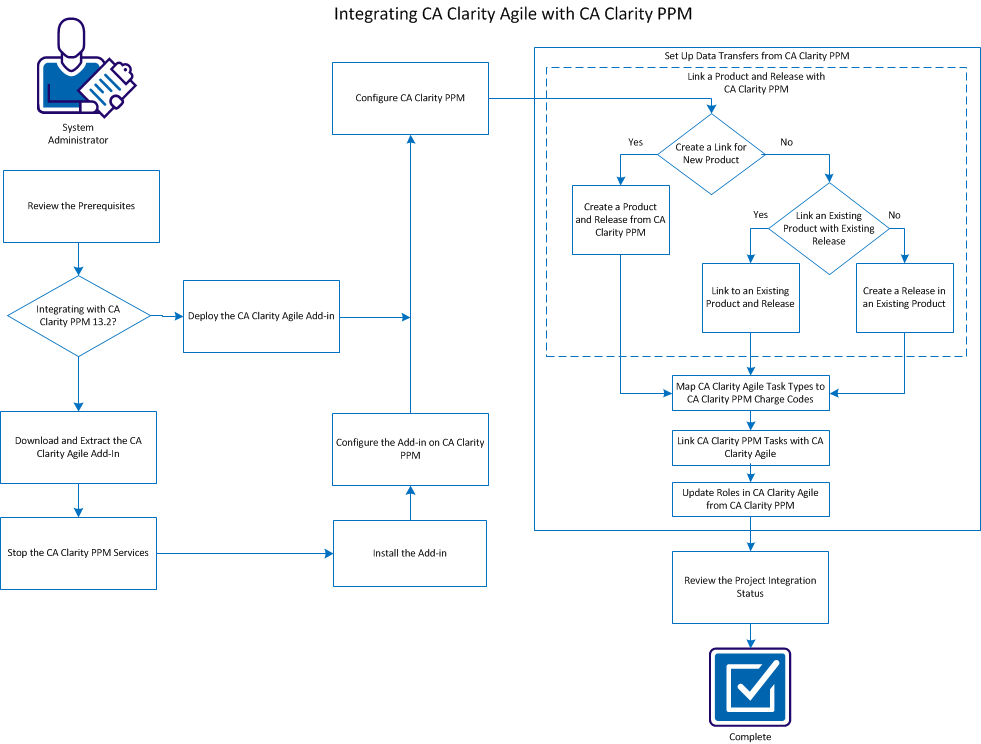
To integrate CA Clarity PPM with CA Clarity Agile, follow these steps:
- Review the prerequisites.
- If integrating with CA Clarity PPM Release 13.2.00, do the following:
- Deploy CA Clarity Agile Add-in.
- Go to Step 7.
- Download and extract the CA Clarity Agile add-in.
- Stop the CA Clarity PPM services.
- Install the add-in.
- Configure the add-in on CA Clarity PPM.
- Configure CA Clarity PPM.
- Set up data transfers from CA Clarity PPM.
- Review the project integration status.
Copyright © 2013 CA.
All rights reserved.
|
|