

Building a product backlog is a continuous process of collecting requirements, customer feedback, and open defects for the product. The product owner builds and manages the product backlog regularly by receiving feedback from customers and understanding their requirements.
For example, for a product Parking Pass Management System, the requirements include the online purchase of passes and payment modes to purchase the passes. These requirements are the backlog items for the product.
The following diagram describes how a product owner builds the product backlog.
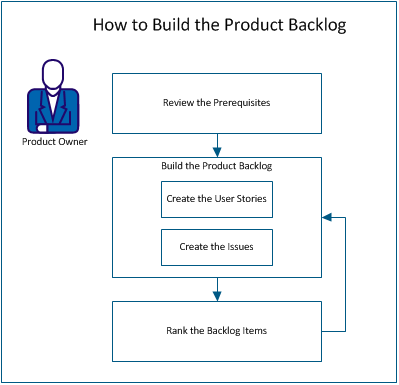
To build the product backlog, perform these steps:
Before you build the product backlog, verify that the product is set up in CA Clarity™ Agile. The product acts as a placeholder to capture all the required features. For example, Parking Pass Management System is the name of the product. Any required feature or issue for this product is added under it.
Create a user story to track the work that is associated with the requirement. A user story describes a feature or functionality requirement for the product. Include enough information in the user story for the team to provide an estimate of the work effort that is required to implement it.
For example, for the product Parking Pass Management System, create a user story named Pay Parking Pass by Credit Card. Include the details of the requirement in the user story, such as mask the field for card security code.
Follow these steps:
You can add issues to the backlog items to track the work that is associated with fixing defects. Defects are the bugs in the product that are observed when using the product. For example, create an issue Unable to Send the Parking Pass Expiration Message. Provide the details of the issue such as steps to reproduce the issue and the expected results.
Follow these steps:
Ranking backlog items in the order in which you want the work completed helps to plan the backlog items for a release. The values in the Rank # column in the backlog list indicate the order of work.
For example, rank the user story “Pay Parking Pass by Credit Card” higher than the user story “Pay Parking Pass by PayPal”.
Follow these steps:
Note: This button is hidden if the Rank # column is visible.
The backlog item is moved to the new place in the list.
Note: You can also rank backlog items by dragging and dropping them in the required order.
You have successfully built the product backlog. Repeat the scenario to add more user stories and issues. As you add more items to the product backlog, you can change their ranking in the order in which you want the work completed.
|
Copyright © 2013 CA.
All rights reserved.
|
|