

Managing Requirements › View and Manage Requirements Lists › View the Requirements Hierarchy
View the Requirements Hierarchy
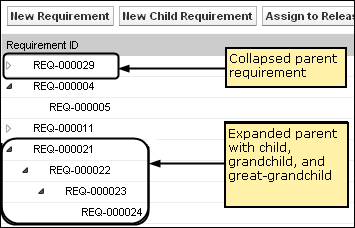
The requirements hierarchy lets you quickly identify which requirements have been associated as parent and child. The list shows in order by parent, with the children below the parent.
Follow these steps:
- Click Requirements, and from Detailed Planning, click Requirements.
- In the View field, select Requirements Hierarchy.
From this list, you can perform the following tasks:
- Click in a field to update values in-line. The field activates if the value can be updated.
- Right-click on a requirement to see a menu to delete, expand, collapse, or edit details of the requirement.
You can create an unlimited number of levels in a hierarchy.
Copyright © 2013 CA.
All rights reserved.
|
|