

The Requirements list page has three list viewing options available:
From this view, you can create new requirements, or can view and edit individual requirements.
Default view of the requirements list page. Use this view to see and manage parent-child relationships between requirements and to create new requirements.
Use this view to see the user stories that are associated with a requirement. You can also click a link to see the detailed information about the requirement, including associated source and persona information.
The Traceability Matrix allows you to see the origin of a requirement and any user story that is associated with the requirement through CA Clarity Agile.
Follow these steps:
You can filter the Traceability Matrix requirements using the filter options.
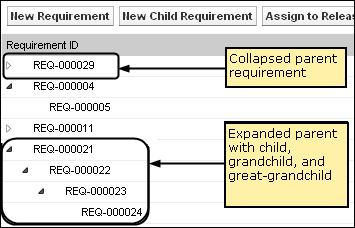
The requirements hierarchy lets you quickly identify which requirements have been associated as the parent and child. The list shows in order by parent, with the children below the parent.
Follow these steps:
From this list, you can perform the following tasks:
You can create an unlimited number of levels in a hierarchy.
|
Copyright © 2013 CA.
All rights reserved.
|
|