

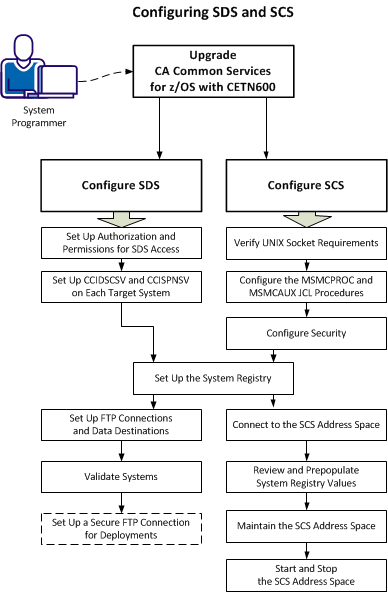
CA Chorus™ Software Manager (CA CSM) can help automate acquiring, installing, maintaining, deploying, and configuring mainframe software. As a system programmer, your responsibilities include configuring the Software Deployment Service (SDS) and Software Configuration Service (SCS) in CA CSM.
The Software Deployment Service (SDS) facilitates product deployment. Deployment is a process of copying SMP/E target libraries from a driving system (where the CA CSM application server is running) to a target (remote destination) system. The target system could be the local z/OS system, a remote z/OS system, a staging system, or a sysplex.
The Software Configuration Service (SCS) facilitates product configuration. Configuration is a process of copying target libraries to run-time libraries and customizing the product for your site to bring it to an executable state.
Use this scenario to guide you through the process:
|
Copyright © 2015 CA Technologies.
All rights reserved.
|
|