

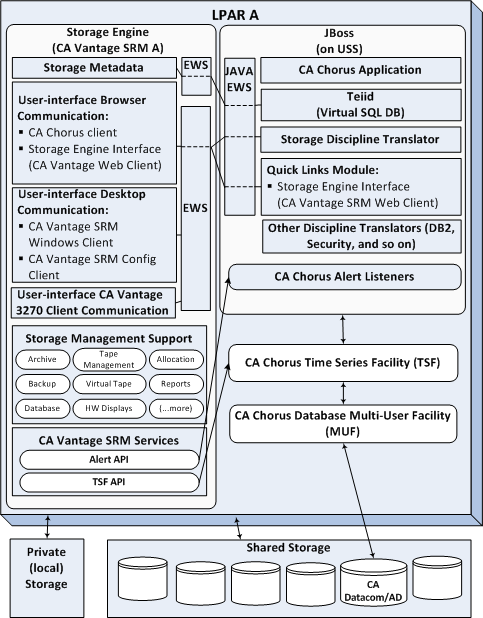
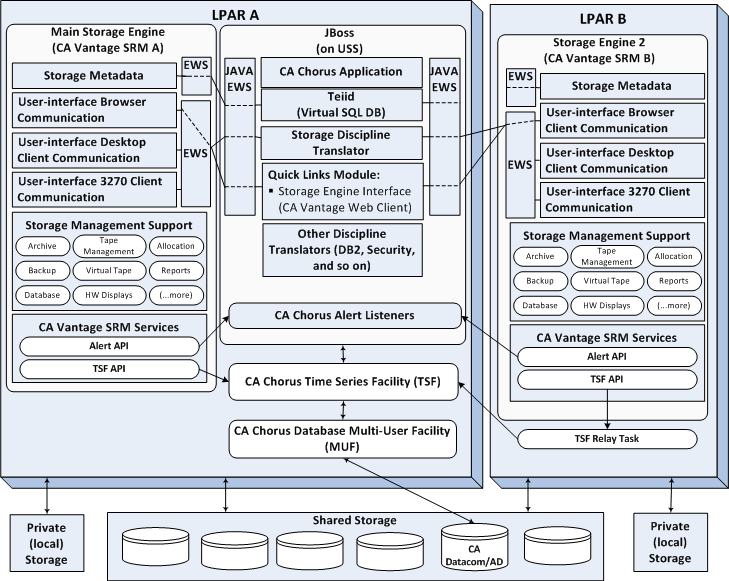
The following diagrams provide an overview of the architecture and setup of CA Chorus for Storage Management. After installation and setup is complete, you can use CA Chorus to manage storage resources across your z/OS enterprise.
Observe the following points:
To install and configure CA Chorus for Storage Management, you must:
The diagrams illustrate the basic architecture and its parts:
Identify logical partitions of a mainframe (z/OS system), on which you execute CA Vantage as a back-end engine for CA Chorus for Storage Management. Multiple LPARs are supported.
Contains the CA Chorus system. Includes the following items:
Provides the browser support and components that communicate with the back-end engines for the various disciplines, such as the storage engine.
Provides a data virtualization system that allows applications to use data from multiple, heterogeneous data stores, or back-end storage engines.
Provides an abstraction layer between the Teiid Query Engine and the storage data source. The translator converts Teiid issued query commands into storage engine-specific commands and executes them.
Launches the Storage Engine Interface (CA Vantage Web Client). If you have multiple CA Chorus disciplines, it also launches their back-end browser interfaces.
Contains other CA Chorus discipline translators, when you have a multiple CA Chorus discipline setup.
Provides JAVA methods for making Enterprise Work Station (EWS) requests to the storage engine. EWS is the proprietary communication protocol over TCP/IP used by the storage engine.
Provide the service for receiving Alerts that are sent by the various back-end storage engines.
Provides the facility for receiving, storing, and querying metrics about objects that are managed by the back-end engines. Because all metrics are stamped with the date and time, a series can be graphed over time to show the past trend, and to project into the future.
Provides the infrastructure for storing and retrieving TSF data within the physical database.
Identifies your CA Vantage systems that are configured to manage your shared and private storage environments.
Provides storage object, field, action, and relationship information displayed in CA Chorus. Storage Metadata is provided by the main storage engine to CA Chorus.
In a multiple storage engine environment, if the main storage engine is not available, CA Chorus selects the next available storage engine as the main storage engine.
Provides the proprietary Enterprise Work Station communication protocol support over TCP/IP by which clients communicate with the storage engine.
Consist of:
Installed in the CA Chorus for Storage Management system and launched from the CA Chorus Quick Links module.
Installed on PCs separately.
Included in and launched from the CA Vantage Windows Client.
Note: For more information about the CA Vantage Windows Client and the CA Vantage Configuration Client, see the CA Vantage documentation.
Included in the CA Vantage installation. For more information, see the CA Vantage documentation.
Identifies the storage management functions to be supported, such as: backup, archive, allocation, management of both regular and virtual tape systems, along with displays of hardware devices and much more.
Pushes Alerts to the CA Chorus Alert Listeners using TCP/IP connections, which are defined in the %%DSNPFX%%.URLS data set.
Pushes TSF data to the CA Chorus TSF started task using TCP/IP connections. From remote Storage Engines, TSF data is pushed to the local TSF Relay Task, which connects through TCP/IP to the CA Chorus TSF.
Represents all storage devices that are shared between z/OS systems.
Represents storage devices, if any, that are not shared with other z/OS systems.
|
Copyright © 2013 CA Technologies.
All rights reserved.
|
|