

Management has grown suspicious of an unauthorized employee attempting to access sensitive payroll information. As a clerk in the mail room, the employee does not require access to payroll information. As a security administrator, you plan to monitor the payroll data set and receive an alert when an unauthorized user attempts to gain access.
The Compliance Policy Administration interface logs active security event records, making event history readily available. The interface lets you create policy statements to identify event records to pass to the Compliance Policy Administration interface components.
By using the Compliance Policy Administration interface and the Alerts module, you can identify the event to monitor and receive an alert notification after an unauthorized attempt.
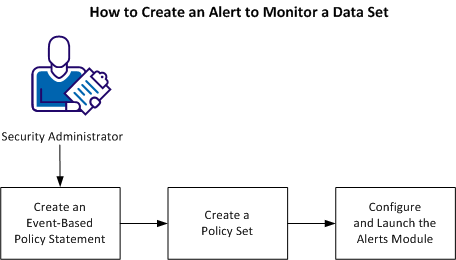
Perform the following tasks to create an alert to monitor a data set:
|
Copyright © 2013 CA Technologies.
All rights reserved.
|
|