

When the CIA real-time feature is enabled, the security product sends updates to CA DSI Server. CA DSI Server invokes the CA DSI Server plugin to send the update to the CIA repository. The result is that the CIA repository is updated and synchronized with the security product database. The CA DSI Server that is used for this process (spawned or standalone) must have the plugin configured. In this example, the CA DSI Server plugin is configured in the standalone CA DSI Server.
The following diagram shows a sample configuration with real-time CIA updates using standalone CA DSI Server servers:
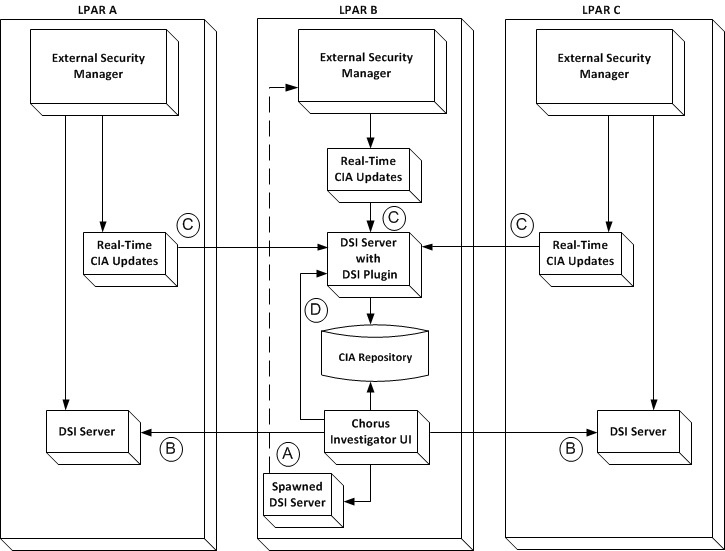
This diagram shows a sample configuration for CIA real-time processing with the CA Chorus UI running on LPAR B. The CA Chorus UI gets data from the CIA repository, which communicates with the CA DSI Server. CA DSI Server receives real-time CIA updates from your external security manager (CA ACF2 or CA Top Secret).
When a user wants to execute a native command from CA Chorus, they launch the Security Command Manager and type in a command. CA Chorus sends the command to the CA DSI Server for execution and results. For this CA DSI Server to Security Command Manager interaction, the CA DSI Server is defined in data set member E1MI0015 in your_chorussec_hlq.CE1MJCL. See the CA Chorus Installation Guide.
Note: The Real-Time CIA updates are a sub-task of the external security manager, not a stand-alone STC.
|
Copyright © 2014 CA Technologies.
All rights reserved.
|
|