

The Time Series Facility (TSF) displays security performance data in CA Chorus. Before you can view this data using TSF, statistics gathering in CA ACF2 or CA Top Secret must be started. Statistics gathering is the process of collecting system statistics and sending data to TSF for a specific time frame, which is measured in seconds.
Note: For more information about activating real-time statistics gathering in CA ACF2, see the CA ACF2 Administration Guide. For more information about activating real-time statistics gathering in CA Top Secret, see the CA Top Secret Control Options Guide.
The following diagram shows a real-time statistical gathering (STATG) configuration for a single enterprise:
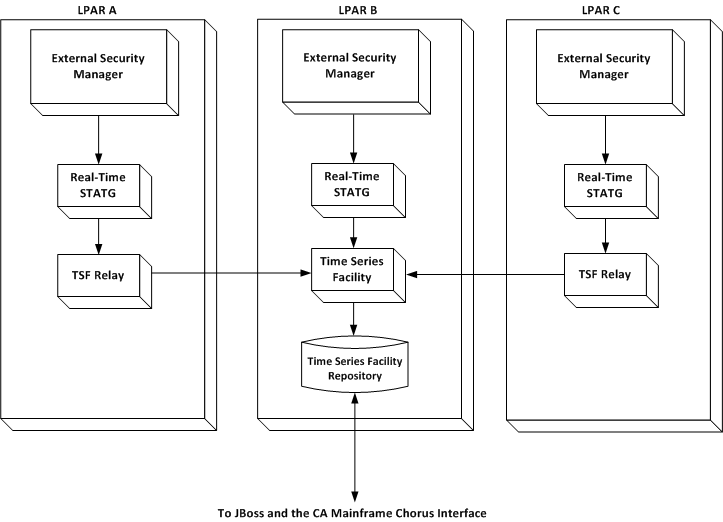
Your external security manager uses the following process to provide real-time statistical data to TSF:
Note the following:
For more information about TSF, see the CA Chorus Installation Guide.
For CA ACF2
To view CA ACF2 metrics in CA Chorus, the STATG bit in the GSO record must be turned on and statistics must be enabled with the Start command. You must wait for the time interval setting before data displays in the metrics panel. Metrics display only when actions are occurring.
Note: The Time Series Facility must be active in order for records to appear in the metrics panel.
Follow these steps:
Specifies to start statistics gathering in CA ACF2 for TSF.
Default: NOSTATG
Specifies the time interval in seconds to capture statistical data that is routed to TSF.
Valid values: 15, 30, 60, 300, 900, 1800, or 3600 seconds
Default: 15
Recommended setting: 30
ACF
SET CONTROL(GSO)
  CONTROL
INSERT CHORUS STATG STATGINT(30)
F ACF2,REFRESH(CHORUS)
Note: You can set additional options to identify the types of statistics you want to gather, define where statistics are written, and so on. For more information about these options, see the CA ACF2 Administration Guide. If CA ACF2 is restarted, statistical information is reset. If the STATG gathering task is deactivated using the STOP command, statistical information is not captured for TSF.
For CA Top Secret
To view CA Top Secret metrics in CA Chorus, the CHORUSSTATG(ON) control option must be set. You must wait for the time interval setting before data displays in the metrics panel. Metrics display only when actions are occurring.
Follow these steps:
Specifies to start statistics gathering in CA Top Secret for TSF.
Default: OFF
Important! Include CHORUSSTATG(ON) in the CA Top Secret parameter file so that it is available at CA Top Secret startup. Otherwise, statistical data gathering (STATG) in CA Chorus needs to be started manually.
Specifies the time interval in seconds to capture statistical data that is routed to TSF.
Valid values: 15, 30, 60, 300, 900, 1800, or 3600.
Default: 15
Recommended setting: 30
Note: You can set additional options to identify the types of statistics you want to gather, and so on. For more information about these options, see the CA Top Secret Control Options Guide.
TSS MODIFY(CHORUSSTATG(ON))
TSS MODIFY(CHORUSSTATI(30))
Security performance data is provided to TSF.
|
Copyright © 2014 CA Technologies.
All rights reserved.
|
|