

This guide details the tasks that a system programmer and security administrator can complete before starting the installation, deployment, and configuration tasks that are described in the Installation Guide. The following diagram provides a high-level overview of the CA Chorus and discipline installation, deployment, and configuration process and the guides that you use.
Important! You must use CA Chorus Software Manager to install CA Chorus and its disciplines.
Important! If you install a discipline, you must deploy and configure it.
Note: For the boxes that indicate work from the discipline Site Preparation Guide, repeat this step for each discipline that you are installing.
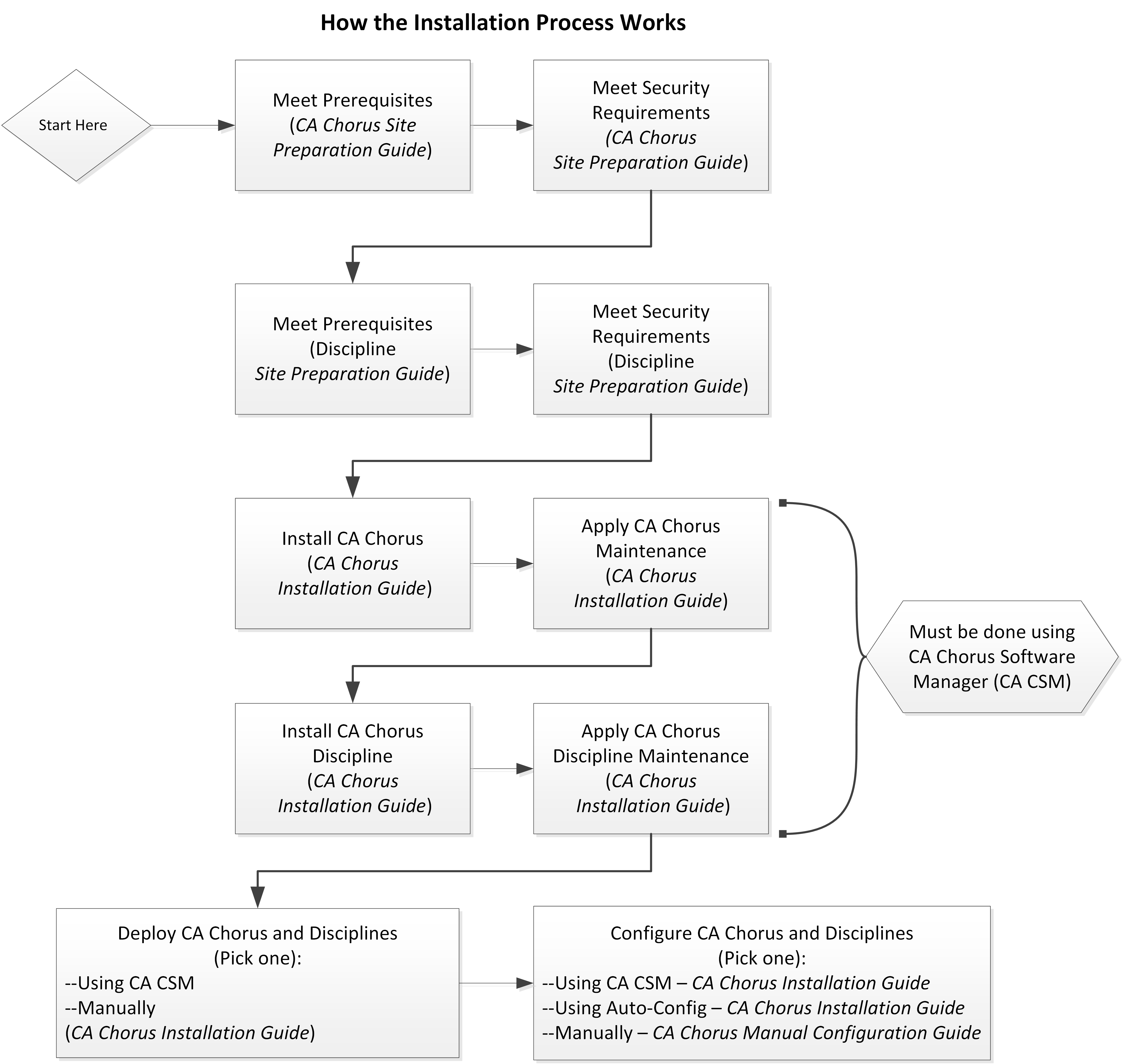
To install, deploy, and configure your CA Chorus and its disciplines, complete the following steps:
This step copies the target libraries to another system or LPAR.
Important! For deployments from CA CSM, you must deploy CA Chorus and your disciplines at the same time. For example, installing CA Chorus, DBA, and Security, and then deploying only CA Chorus and DBA is not supported.
Important! To use the CA CSM Software Configuration Service, CA CSM deployment is required.
Note: We recommend one of the first two options as the most efficient method to configure your products.
This method lets you use the wizard-based CA CSM tools to configure the product. For this configuration method, a deployment using CA CSM is required.
The Installation Guide includes the CA Chorus and discipline steps for this method.
This method lets you edit one batch job (ETJICUST) and one configuration file. A Java program then propagates your changes to the applicable members. You then manually submit each job. For this option, we recommend that you configure the platform and disciplines at the same time.
The Installation Guide includes the CA Chorus and discipline steps for this method.
This method lets you manually edit and run each configuration job.
For this method, configure CA Chorus and its disciplines using the Manual Configuration Guide.
Your CA Chorus system is installed, deployed, and configured.
The CA Chorus for Security and Compliance Management discipline can be installed using an automated or manual process.
Unloads and configures the security discipline software prerequisites as a single set. The unified method simplifies and expedites the installation process. At this time, the unified method supports CA Datacom/AD on a single system. If you wish to install on multiple systems or want to use DB2 as your database, use the manual method. To install the CA Chorus for Security and Compliance Management discipline using the automated method see Unified Install Process.
Manually steps you through the unloading and configuration of the security software prerequisites. The manual method supports CA Datacom/AD and DB2 and lets you install on multiple systems. You can also select specific components of CA Compliance Manager such as Alerts or Logger. To install the CA Chorus for Security and Compliance Management discipline using the manual method, see Addressing General Prerequisites for Manual Installation.
The following diagrams provide an overview of the CA Chorus for Security and Compliance Management discipline architecture. After installation and setup, use it to manage security resources across your z/OS enterprise.
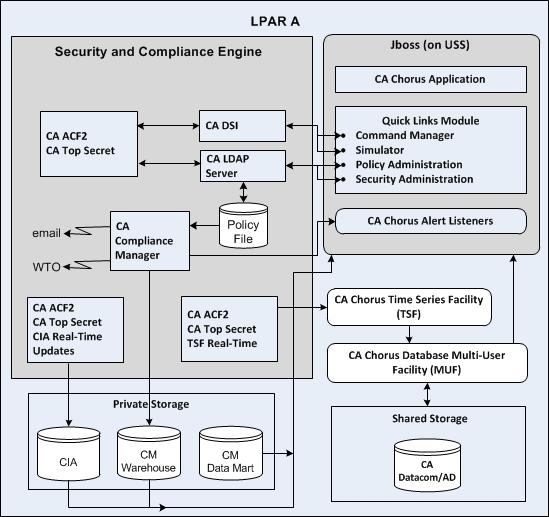
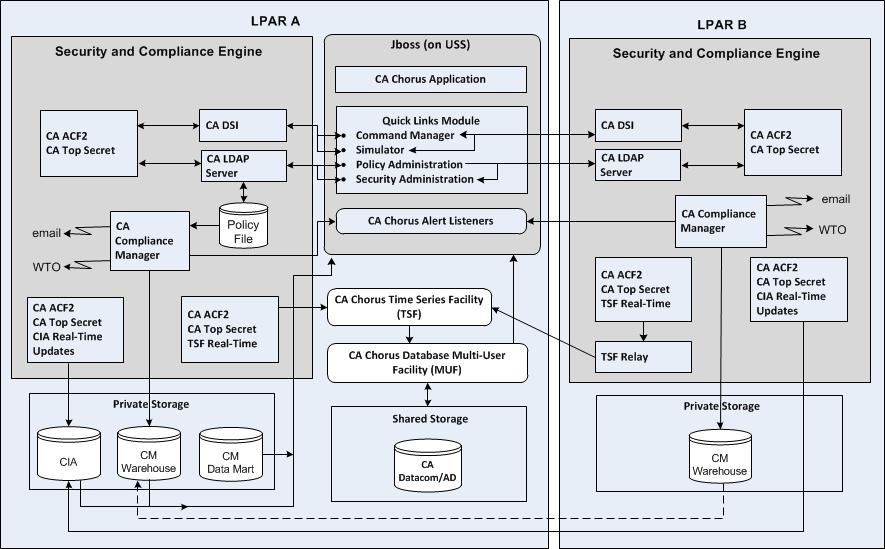
Observe the following:
To install and configure this discipline you must:
The diagrams illustrate the basic architecture:
Identify logical partitions of a mainframe (z/OS system), on which you execute your External Security Manager (ESM) as a back-end engine for this discipline. Multiple LPARs are supported.
Contains the CA Chorus system. Includes the following components:
Provides the browser support and components to communicate with the back-end engines for the various disciplines, such as the security engine.
For this discipline this module includes the Administer Compliance Policy, Administer Security Definitions, and Simulate Access Attempt interfaces.
Issues native commands to backend security engines from the CA Chorus interface.
Provides the service for receiving Alerts sent by the various backend security engines.
Provides the facility for receiving, storing, and querying metrics about objects managed by the security backend engines. Because all metrics are date- and time-stamped, a series can be graphed over time to show trends, and to project into the future.
Provides the infrastructure for storing and retrieving TSF.
Composite of the ESM and compliance products that together provide the input to this discipline. Includes but is not limited to CA ACF2, CA Top Secret, CA Compliance Manager, and CA LDAP Server.
Represents all storage devices that are shared across the CA Chorus disciplines.
Represents storage devices that are shared only across this discipline.
|
Copyright © 2014 CA Technologies.
All rights reserved.
|
|