

The Time Series Facility (TSF) displays application performance data in CA Chorus. Before you can view application performance data using TSF, start statistics gathering in CA Detector. Statistics gathering is the process of collecting system statistics and sending data to TSF for a specific time frame (collection interval).
Note: This configuration is not required for integration with CA Chorus Infrastructure Management for Networks and Systems.
Important! This step must be performed manually outside of CA Chorus Software Manager.
The following diagram shows the statistics gathering configuration for a single enterprise:
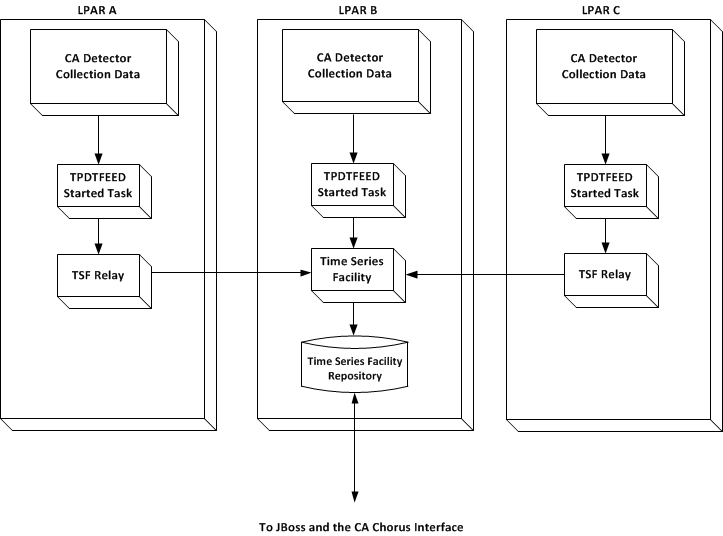
In the previous diagram, CA Detector passes collection data automatically from each DB2 subsystem being monitored (LPAR A, B, and C) to TSF when a collection interval ends using the TPDTFEED started task. The TSF relay passes data to TSF from remote LPAR A and C. TSF saves the data in the TSF repository.
|
Copyright © 2015 CA Technologies.
All rights reserved.
|
|