

The following diagram provides a high-level overview of the CA Chorus and discipline installation, deployment, and configuration process and the guides that you use.
 Stop and read the Site Preparation Guide before continuing. Do not continue until you have completed all security and prerequisite work as noted in the CA Chorus Platform Site Preparation Guide and the applicable discipline Site Preparation Guide.
Note: The grayed out boxes indicate tasks that the system administrator and security administrator must have completed before starting the actual installation.
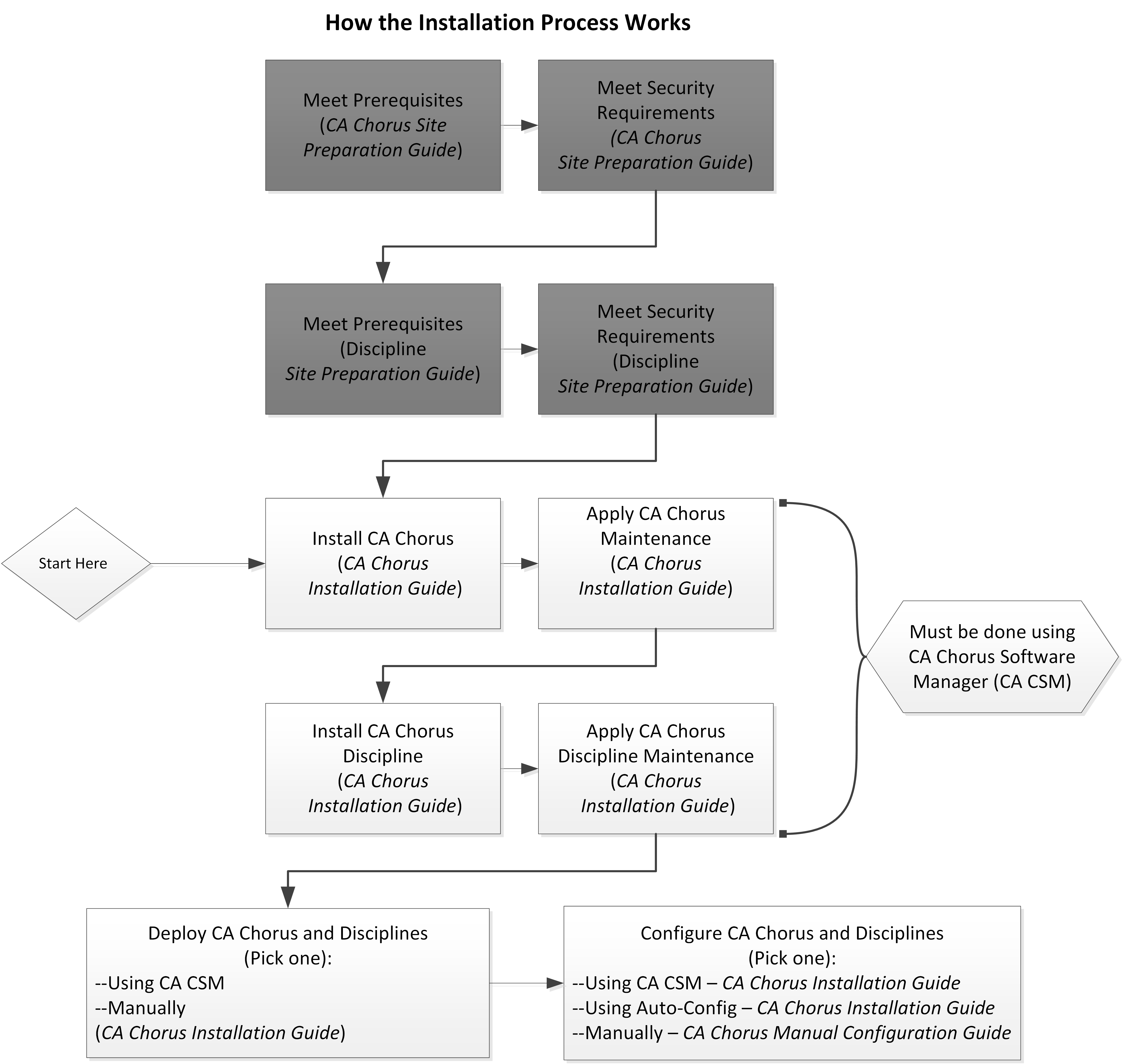
To install, deploy, and configure your CA Chorus and its disciplines, complete the following steps:
Important! Review the following points before you continue:
-- Install the Third-Party Pre-reqs and then the CA Chorus platform before you install any disciplines.
-- You must use CA Chorus Software Manager to install CA Chorus and its disciplines.
-- If you install a discipline, you must deploy and configure it.
This step copies the target libraries to another system or LPAR.
Important! For deployments from CA Chorus Software Manager (CA CSM), deploy CA Chorus and your disciplines at the same time. For example, installing CA Chorus, DBA, and Security, and then deploying only CA Chorus and DBA is not supported.
Important! To use the CA CSM Software Configuration Service, CA CSM deployment is required.
Note: We recommend one of the first two options as the most efficient method to configure your products.
This method lets you use the wizard-based CA CSM tools to configure the product. For this configuration method, a deployment using CA CSM is required.
For this method, configure CA Chorus and its disciplines using the Installation Guide.
This method lets you edit one batch job (ETJICUST) and one configuration file. A Java program then propagates your changes to the applicable members. You then manually submit each job. For this option, we recommend that you configure the platform and disciplines at the same time.
For this method, configure CA Chorus and its disciplines using the Installation Guide.
This method lets you manually edit and run each configuration job.
For this method, configure CA Chorus and its disciplines using the Manual Configuration Guide.
Your CA Chorus system is installed, deployed, and configured.
|
Copyright © 2015 CA Technologies.
All rights reserved.
|
|