

|
|
|
Mart comprises the following components:
The Mart application includes a web-based component named CA ERwin Mart Administrator. CA ERwin Mart Administrator helps you manage Mart through a web console.
The Web server hosts CA ERwin Mart Administrator and you can use a Web server of your choice. If you have not installed a Web server, use the ERwin Mart Server option and install Tomcat.
Install one of the following databases for the Mart database:
After installing Web server and the Mart server, provide the details of their properties.
The following diagram illustrates how to install and configure Mart:
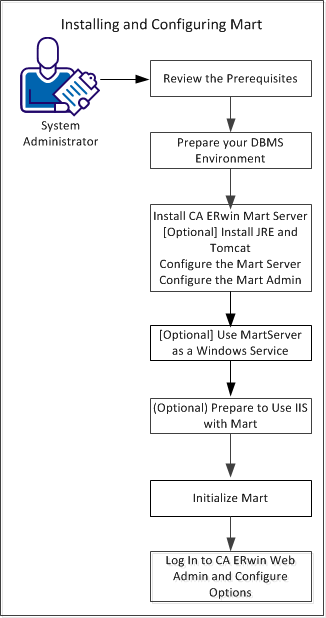
Complete the following steps to install and configure Mart:
| Copyright © 2012 CA. All rights reserved. |
|