Applying a Theme to a Model
Applying a Theme to a Model
Themes can be defined as a collection of font and color settings. You can apply themes to a model, an object, or a group of objects, or a subject area to achieve the following objectives:
- Maintain the organizational design standard
- Denote the development lifecycle of a model
- Customize designs in a model for various end users, for example, Human Resource or Marketing departments
Themes are applied in the following hierarchical order:
- Model - to replace the default theme that a new model uses.
- Subject Area - to override the theme of the model.
- Diagram - to override the theme of its owner (Model or Subject Area).
- Entity, View, Cached View, Annotation, or Attribute - to override the theme of the diagram.
- Drawing Object - to override all other themes. However, you cannot do an override on an attribute because attributes have no drawing objects. At the drawing object level, individual characteristics of a theme can be overridden once you select a theme.
For example, you are a Business Analyst in a software company. You want to do the following tasks:
- Maintain an organizational design standard in the Employee database.
- Organize the Employee database according to the departments in the company.
You identify all the departments in the company and create a theme for each department. You apply the themes to all of the departments to identify each department and its employees. This example is used consistently to explain all the procedures involved in creating and applying a theme.
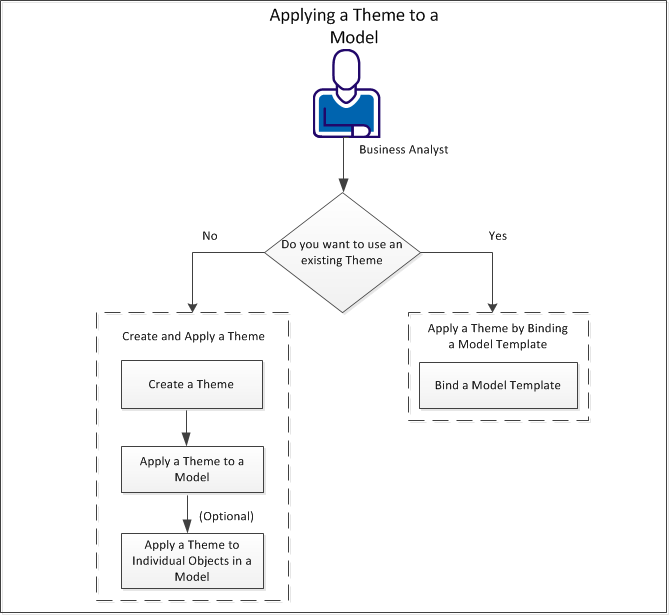
Perform the following tasks to apply a theme:
|
Copyright © 2012 CA.
All rights reserved.
|
|

