

|
|
|
組織の要件
組織の LDAP サーバにすでに定義されている既存のユーザを使用します。 また、組織のポータルは、CA Business Service Insight ログイン、およびシングル サインオン(SSO)ポータルの CA Business Service Insight サイレント ログイン機能を使用したアクセスに使用されます。
CA Business Service Insight システム(LDAP 同期)に自動的にユーザを作成する Visual Basic(VB)変換スクリプトを定義します。この変換スクリプトは、組織の LDAP サーバに接続し、そこからユーザのリストを抽出するために使用されます。 ユーザ、グループ、および役割の作成には、CA Business Service Insight ツール パッケージのメソッドが使用されます。
LDAP に接続する VB コードの例
Option Explicit On
Imports System.DirectoryServices
    Public Function GetLDAPUsers(ByVal ldapServerName As String, ByVal pFindWhat As String) As ArrayList
        Dim oSearcher As New DirectorySearcher
        Dim oResults As SearchResultCollection
        Dim oResult As SearchResult
        Dim RetArray As New ArrayList
        Dim mCount As Integer
        Dim mIdx As Integer
        Dim mLDAPRecord As String
        Dim ResultFields() As String = {"securityEquals", "cn"}
        Try
            With oSearcher
                .SearchRoot = New DirectoryEntry("LDAP://" & ldapServerName & _
          "/dc=lippogeneral,dc=com")
                .PropertiesToLoad.AddRange(ResultFields)
                .Filter = "cn=" & pFindWhat & "*"
                oResults = .FindAll()
            End With
            mCount = oResults.Count
            If mCount > 0 Then
                For Each oResult In oResults
                    mLDAPRecord = oResult.GetDirectoryEntry().Properties("cn").Value & "  " & oResult.GetDirectoryEntry().Properties("mail").Value
                    RetArray.Add(mLDAPRecord)
                次へ
            End If
        Catch e As Exception
            MsgBox("Error is " & e.Message)
            Return RetArray
        End Try

        Return RetArray
    End Function

Sub CheckAddUser
Dim map
Set map = Tools.GetUserDetails("acme@Test")
'Check user already exists
'Tools.AddUserByMap map
'Check with duplicate
map("UserName") = "acme2"
map("UserPassword") = "acme2"
map("UserPasswordExpirationInterval") = "50"
map("UserDescription") = "New description"
map("UserStatus") = "INACTIVE"
Tools.AddUserByMap map
Tools.Commit
End Sub
CA Business Service Insight VB 変換スクリプトのメソッド
AddOrganization / IsOrganizationExists
IsRoleExists / SearchRoles
AddUserByMap / GetUserName
GetOrganizationName / IsUserExists
GetUserDetails / SearchUsers
GetUserFullName / UpdateUserByMap
AddUserGroupByMap / IsUserGroupExists
DeleteUserGroup / SearchUserGroups
GetUserGroupDetails / UpdateUserGroupByMap
「サイレント ログイン」を行うコードを作成して、CA Business Service Insight ログインに使用される組織のポータルに統合します。
CA Business Service Insight ゲートウェイの C# コードの例(組織のポータルに統合される)
using System;
using System.Data;
using System.Configuration;
using System.Collections;
using System.ComponentModel;
using System.Drawing;
using System.Web;
using System.Web.Security;
using System.Web.SessionState;
using System.Web.UI;
using System.Web.UI.WebControls;
using System.Web.UI.WebControls.WebParts;
using System.Web.UI.HtmlControls;
using System.Security.Cryptography.X509Certificates;
using OblicoreAuthenticationWebService;

namespace Oblicore.SSO
{
      /// <summary>
      /// This sample page is a sample gateway to Oblicore Guarantee(tm) application interface
      /// The page should be called prior navigating to any page at Oblicore Guarantee website
      /// or any page using Web Services supplied by Oblicore
      /// The OblicoreGateway page should perform the following actions:
      ///         1) Call Oblicore Authentication Web service in order to authenticate current user
      ///         2) Call SilentLogin.asp page at Oblicore website to login silently at Oblicore website
      ///            and create user session context
      ///         3) Redirect to desired page
      /// </summary>
      public partial class _Default : System.Web.UI.Page
      {

            /// <summary>
            /// Oblicore user credentials
            /// </summary>
            struct UserCredentials
            {
                  public string UserName;
                  public string Organization;
            }

            private void Page_Load(object sender, System.EventArgs e)
            {

                  if (Request["OGSESSIONID"]!=null)
                  {
                        //We have been redirected back to this page from SilentLogin.asp after authentication.
                        //Save OGSESSIONID in cookie for further use
                        HttpCookie SessionCookie = new HttpCookie("OGSESSIONID",Request["OGSESSIONID"]);
                        Response.Cookies.Add(SessionCookie);
                        //Redirect to desired page
                        Response.Redirect("/");
                  }
                  else
                  {
                        //First time we enter the page.
                        //Let's perform authentication.

                        string sAuthToken = string.Empty;

                        // Obtain OG user name and organizations from portal user directory
                        UserCredentials ucOblicoreUser = GetOblicoreUserCredentials();

                        //Initialize Oblicore Authentication WebServce
                        //Project should include Web Reference to the service
                        //Service is located on Oblicore Guarantee website at /WebServices/OblicoreAuth.asmx
                        OblicoreAuth oAuthService = new OblicoreAuth();
                     //     oAuthService.ClientCertificates.Add(x509);
                        oAuthService.Url = "https://" + "localhost" + "/WebServices/OblicoreAuth.asmx";
                        try
                        {
                              //Invoke authentication Web Service.
                              //The AuthenticateUser method returns encrupted token, which should be passed to
                              //SilentLogin.asp page, located in root folder of Oblicore Guarantee website
                              sAuthToken = oAuthService.AuthenticateUser(ucOblicoreUser.UserName,ucOblicoreUser.Organization);
                        }
                        catch (Exception ex)
                        {
                              //Proceed authentication error if any
                              Response.Write("The error has occurs during Oblicore authentication: " + ex.Message);
                              Response.End() ;
                        }

                        //Call SilentLogin.asp page along with passing it authentication folder
                        //SilentLogin.asp page is located Oblicore Guarantee website root folder
                        //After logging in, SilentLogin.asp page will redirect us back to the current page along with passing OGSESSIONID parameter
                        //Response.Redirect(ConfigurationSettings.AppSettings["OGURL"].ToString() + "/SilentLogin.asp?AuthToken="+Server.UrlEncode(sAuthToken)+"&DesiredPage="+GetCurrentPageURL());
                        Response.Redirect("https://vit-05/SilentLogin.asp?AuthToken=" + Server.UrlEncode(sAuthToken) + "&DesiredPage=/Oblicore.asp"); // + GetCurrentPageURL());
                  }
            }


            /// <summary>
            /// Obtain Oblicore Guarantee user name and organization from portal user directory
            /// The method is supposed to call ActiveDirectory or another repository using portal API
            /// to obtain current user name and organization in terms of Oblicore Guarantee
            /// </summary>
            /// <returns>Oblicore Guarantee user credentials struct</returns>
            private UserCredentials GetOblicoreUserCredentials()
            {
                  UserCredentials ucOblicoreUser = new UserCredentials();
                  //currently alwasy assume user is sadmin and organization is Oblicore (default)
                  ucOblicoreUser.UserName = "sadmin";
                  ucOblicoreUser.Organization = "Oblicore";
                  return ucOblicoreUser;
            }


            /// <summary>
            /// Retrieves current page URL
            /// </summary>
            /// <returns>Full URL of current page</returns>
            private string GetCurrentPageURL()
            {
                  string s = (Request.ServerVariables["HTTPS"]==null||Request.ServerVariables["HTTPS"].ToLower()=="off")?"http://":"https://";
                  s += Request.ServerVariables["SERVER_NAME"] + Request.ServerVariables["URL"];
                  if (Request.QueryString.ToString() != string.Empty)
                  {
                        s += "?"+Request.QueryString.ToString();
                  }
                  return s;
            }

            #region Web Form Designer generated code
            override protected void OnInit(EventArgs e)
            {
                  //
                  // CODEGEN: This call is required by the ASP.NET Web Form Designer.
                  //
                  InitializeComponent();
                  base.OnInit(e);
            }

            /// <summary>
            /// Required method for Designer support - do not modify
            /// the contents of this method with the code editor.
            /// </summary>
            private void InitializeComponent()
            {
                  this.Load += new System.EventHandler(this.Page_Load);
            }
            #endregion
      }
}
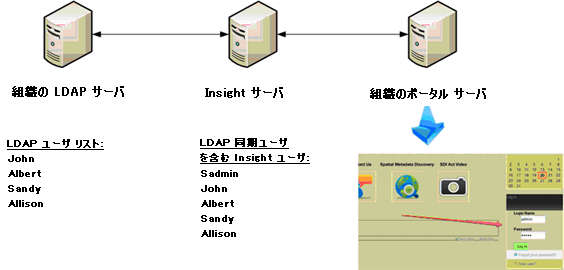
以下のダイアグラムは、ユーザ同期プロセスおよびポータル アクセスのフローを示しています。 変換スクリプトは定期的に実行されるように設定されています。 このスクリプトは、LDAP のユーザ リストを最新の状態に維持し、必要に応じてユーザを追加/削除します。
ユーザが組織のポータルにログインします。 ポータルは、CA Business Service Insight サーバにそれらをリダイレクトするか、別の利用可能なアプリケーションのリストを表示するように設定できます。 CA Business Service Insight サーバは、最初のポータルへのログインで指定された認証情報を使用します。
| Copyright © 2012 CA. All rights reserved. | このトピックについて CA Technologies に電子メールを送信する |