

|
|
|
このセクションで説明されているデザイン パターンは、以下の例のように、必要な結果がイベント間で消滅した期間の関数である場合は常に適切です。
累積時間については、時間が累積できる変数(秒)を割り当て、最後に更新されてからの累積時間と条件の両方をチェックする関数を実装することが必要です。 そして、この関数は、式が受信したイベントすべてに対して実行されます。
以下の図は、クロック処理時間の累積を示しています。
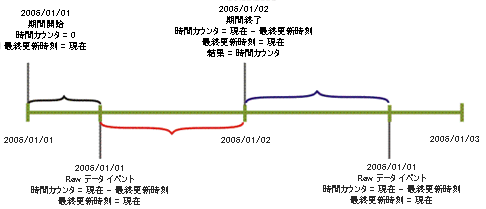
LastUpdateTime 変数には、時間カウンタが更新されたかどうかに関わらず、最後に更新が実行された時刻が格納されます。 その関数には、時間が更新されて累積される必要があるかどうかを決定する条件が保持されています。 たとえば、時間帯の時間を過ぎる場合、システム状態が停止の場合、またはインシデントが保留状態の場合、時間を考慮してはいけません。
ここで詳しく説明されている状況では Tools.NetTime() 関数を使用して遅延を計算していることがよくありますが、標準の VB 関数である DateDiff() を使用する方が好ましい場合もある可能性があります。
Tools.NetTime 関数は、使用するたびに時間帯を確認するオーバーヘッドが生じます。 これらのプロシージャは新規の着信イベントに対して呼び出され、したがって NetTime コールを呼び出すため、データ イベント プロシージャでは NetTime の使用を避けることが推奨されます。 時間帯が 1 日 24 時間週 7 日ある場合、時間帯を確認するオーバーヘッドを避けるために DateDiff 関数を使用することを推奨します。
例 1:
以下の 'カウンタを更新する' ルーチンは、PeriodNetTime 変数内の合計期間を累積します。 このルーチンは AvailabilityTime にシステムが「稼動」、つまりシステムが利用可能な状態である時間を累積します。
ツール オブジェクトには NetTime メソッドの NetTime(beginTime, endTime)0 が含まれます。 このメソッドは、現在のメトリックの時間帯内にある beginTime と endTime 間の秒数を返します。 これら 2 つの変数間の時間は、実行される時間帯の一部であり、したがって時間帯が使用される遅延計算用として非常に一般的に使用されます (たとえば、4 業務時間内に解決される優先度 1 チケットに対して、チケットは業務時間の最後に発生し、翌日朝まで解決されない可能性がありますが、除外されている時間帯の時間のせいでそれでも SLA 内です)。
Sub UpdateCounters (time)
   PeriodNetTime = PeriodNetTime + tools.NetTime (LastUpdateTime, time)
   If SystemStatus = UP Then
      AvailabilityTime = AvailabilityTime + tools.NetTime (LastUpdateTime, time)
   End If
   LastUpdateTime = time
End Sub
例 2:
以下の例では、いくつかのきわめて重要なコンポーネント中の稼動および停止イベントおよびこれらのコンポーネントの保守イベントの処理により、アプリケーションの可用性を計算します。 すべてのコンポーネントが保守中の場合、時間は予想される可用性時間とは見なされません。
UpdateCounters サブルーチンは必要に応じてタイム カウンタを早め、また式(Raw データ イベント/エンジン イベント)に受診されたすべてのイベントで実行されます。 またそれは、時間が時間帯期間内にあり、コンポーネントが予定のダウンタイム期間にない場合の予想使用可能時間を更新します。 式が実際の可用性時間を更新するのは、システム状態が「稼動」のときのみです。
DateDiff は、2 つの日付間の時間を返す標準的な VB 関数ですが、時間帯情報を除外しません。
'Force variable declaration
Option Explicit

'Global variables
Dim ExpectedAvailabilityTime
Dim ActualAvailabilityTime
Dim LastUpdateTime
Dim AvailabilityIndicators
Dim MonitoredComponents
Dim DowntimeStatuses

'Map objects creation
Set AvailabilityIndicators=CreateObject("SlalomMap.Map")
Set MonitoredComponents=CreateObject("SlalomMap.Map")
Set DowntimeStatuses=CreateObject("SlalomMap.Map")

'After loading and whenever an infrastructure change occurs
Sub OnRegistration(dispatcher)
   dispatcher.RegisterByResourceGroup "OnComponentDownEvent","Component Down","Application Components"
   dispatcher.RegisterByResourceGroup "OnComponentUpEvent","Component Up","Application Components"
   dispatcher.RegisterByResourceGroup "OnMaintenanceStartEvent","Maintenance Start","Application Components"
   dispatcher.RegisterByResourceGroup "OnMaintenanceEndEvent","Maintenance End","Application Components"
   UpdateCounters Context.RegistrationTime

   Dim AllocatedComponents
   Set AllocatedComponents = Context.ResourcesOfResourceGroup("Application Components")

   'make sure formula is monitoring only relevant and all the relevant resources
   UpdateMonitoredComponents AllocatedComponents
End Sub

Sub OnLoad(time)
   'When system goes up for the first time - assume availability OK
   LastUpdateTime = time
End Sub

Sub OnPeriodStart(time)
   'initializing counters to renew periodic calculation
   ExpectedAvailabilityTime = 0
   ActualAvailabilityTime = 0
End Sub

Sub OnTimeslotEnter(time)
   UpdateCounters time
End Sub

Sub OnTimeslotExit(time)
   UpdateCounters time
End Sub

Sub OnComponentDownEvent(eventDetails)
   UpdateCounters eventDetails.Time
   'write availability status of reported-on resource
   AvailabilityIndicators(eventDetails.ResourceId) = _
      AvailabilityIndicators(eventDetails.ResourceId)+1
End Sub

Sub OnComponentUpEvent(eventDetails)
   UpdateCounters eventDetails.Time
   'write availability status of reported-on resource
   AvailabilityIndicators(eventDetails.ResourceId)= _
      AvailabilityIndicators(eventDetails.ResourceId)-1
End Sub

Sub OnMaintenanceStartEvent(eventDetails)
   UpdateCounters eventDetails.Time
   'write availability status of reported-on resource
   DowntimeStatuses(eventDetails.ResourceId)= _
      DowntimeStatuses(eventDetails.ResourceId)+1
End Sub

Sub OnMaintenanceEndEvent(eventDetails)
   UpdateCounters eventDetails.Time
   'write availability status of reported-on resource
   DowntimeStatuses(eventDetails.ResourceId)= _
      DowntimeStatuses(eventDetails.ResourceId)-1
End Sub

Sub OnPeriodEnd(time,isComplete)
   UpdateCounters 時間
End Sub

Function Result
   If ExpectedAvailabilityTime <> 0 Then
      Result = 100 * (ActualAvailabilityTime / ExpectedAvailabilityTime)
   Else
      Result = Null
   End If
End Function

Sub UpdateCounters(time)
   If Context.IsWithinTimeslot And Not AllComponentsAreInPlannedDowntime Then
      'update counter of seconds in period (when availability is expected)
      ExpectedAvailabilityTime = ExpectedAvailabilityTime + DateDiff("s",LastUpdateTime,time)
      If SystemIsAvailable Then
         'update seconds-of-availability counter
         ActualAvailabilityTime = ActualAvailabilityTime + DateDiff("s",LastUpdateTime,time)
      End If
   End If
   LastUpdateTime=time
End Sub

Sub UpdateMonitoredComponents(allocatedComponents)
   Dim Component
   'add to monitored Components map all new Components to be monitored
   For Each Component In allocatedComponents
      If Not MonitoredComponents.Exist(Component) Then
         MonitoredComponents(Component) = Component
         AvailabilityIndicators(Component) = 0
         DowntimeStatuses(Component) = 0
      End If
   Next

   'remove from monitored Components map all no-longer-relevant Components
   For Each Component In MonitoredComponents
      If Not allocatedComponents.Exist(Component) Then
         MonitoredComponents.Erase Component
         AvailabilityIndicators.Erase Component
         DowntimeStatuses.Erase Component
      End If
   Next
End Sub

Function SystemIsAvailable
   Dim SystemAvailability
   SystemAvailability = True

   Dim Component
   Dim ComponentAvailability
   For Each Component In MonitoredComponents
      ComponentAvailability = AvailabilityIndicators(Component) = 0 _
         Or DowntimeStatuses(Component) > 0
      'system availability is evaluated with availability
      SystemAvailability = SystemAvailability And ComponentAvailability
   Next
   SystemIsAvailable = SystemAvailability
End Function

Function AllComponentsAreInPlannedDowntime
   Dim ComponentsInPlannedDowntime
   ComponentsInPlannedDowntime = 0
   Dim Component
   For Each Component In MonitoredComponents
      If DowntimeStatuses(Component) > 0 Then
         ComponentsInPlannedDowntime = ComponentsInPlannedDowntime + 1
      End If
   Next

   If ComponentsInPlannedDowntime = MonitoredComponents.Count Then
      AllComponentsAreInPlannedDowntime = True
   Else
      AllComponentsAreInPlannedDowntime = False
   End If
End Function
| Copyright © 2012 CA. All rights reserved. | このトピックについて CA Technologies に電子メールを送信する |