

CA Business Service Insight is a multi-tiered application capable of being deployed on any number of servers. The number can range from one (standalone deployment) to many (3-tier, or higher for high availability deployments or for multiple application server instances).
Communications between processes are not always significant in a single server deployment however, once the number of servers increases it becomes more important to understand communications between processes to ensure that they are able to occur and to ensure stable application performance.
Most deployments in corporate environments use the standard 3 tier model, which often encounters firewalls between physical servers for various reasons. This section outlines communications CA Business Service Insight uses. The section details the various communications protocols and ports to enable straightforward configuration of firewalls.
This section contains the following topics:
Additional Communications (Optional)
The diagram shows a typical deployment scenario, in which a firewall (FW) separates each logical application layers. Each logical layer is in its own zone, similar to configuration in a corporate environment.
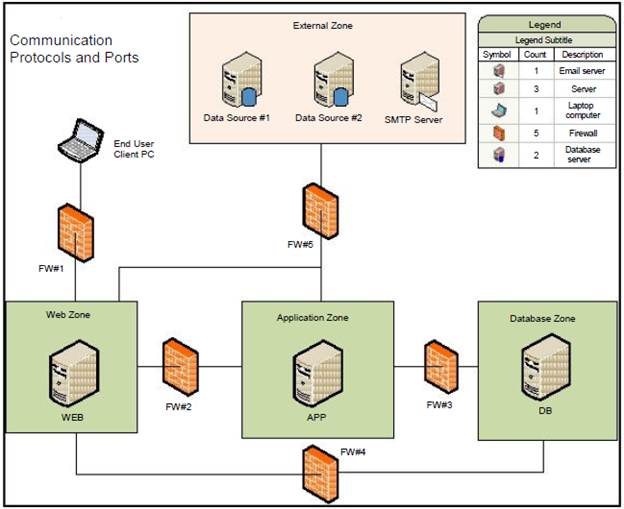
The following table details the processes involved in communications from each zone.
|
Zone |
Process Component |
Explanation |
|
|
Web |
IIS Web Server |
Serving web content to the client browsers, and retrieving data from Database. |
|
|
COM+ Components |
Performing actions on DB & retrieving data and sending SMTP messages. |
||
|
API |
Handles incoming web services requests. |
||
|
Authentication Service (SSO/LDAP) |
Handles external authentication request. |
||
|
Application |
Adapters Listener Service |
Handle incoming Adapter connections from Adapter instances. |
|
|
Adapter Deployment Service |
Deploys and controls the locally deployed “managed” adapters. |
||
|
Log Server |
Logs all incoming messages from CA Business Service Insight COM+ components and Application Services (TaskHost, Alerts and others). |
||
|
Dashboard Service |
Updates the status and results of the Dashboard components. |
||
|
ACE Engine (PSL) |
Calculates all service level results and provides information for other dependent application services (Dashboard, Alerts and others). |
||
|
ACE2 Engine |
Calculates all service level results and provides information for other dependent application services (Dashboard, Alerts and others). |
||
|
Report Scheduler Service Alerts Service (SMTP) |
Sends SMTP messages from the Application server. |
||
|
Adapter Instances |
Connect to the data sources and handle the collection of raw data using the Adapter Listener Service (when deployed locally on the Application server). |
||
|
Database |
Oracle Database |
Stores and manages all application data. |
|
|
Database Listener |
Handles incoming connections to the database. |
||
|
External |
Adapter Instances |
Connect to the data sources and handle the collection of raw data using the Adapter Listener Service (when deployed remotely). |
|
|
Adapter Deployment service |
Deploys and controls the remotely deployed “managed” adapters. Deploy the service on the same machine as each remotely deployed adapter. |
||
|
|
|||
|
|
|||
|
|
This section provides details on all of the communications that occur between the application components.
|
Process (Source) |
FW # |
Destination |
Protocol |
Default Ports |
Direction |
Change |
|
|---|---|---|---|---|---|---|---|
|
Web Zone Originating |
|||||||
|
IIS Web Server |
2 |
Log server (App Server) |
TCP |
4040 |
Out |
Y |
|
|
IIS Web Server |
2 |
Adapter Deployment Service (Application Server) |
TCP |
1008 |
Both |
Y |
|
|
IIS Web Server |
2 |
Dashboard Service (Application Server) |
.Net Remoting |
8004 |
Both |
Y |
|
|
IIS Web Server |
5 |
Authentication WebService (External) |
SOAP/ |
4515 |
Both |
Y |
|
|
IIS Web Server Email |
5 |
SMTP Server (External) |
SMTP |
25 |
Out |
N |
|
|
COM+ Components |
4 |
Database Server |
TCP (SQL *Net) |
1521 |
Both |
Y |
|
|
SMI |
|
|
|
|
|
|
|
|
Oblisync |
|
|
|
See note. |
|
|
|
|
MSMQ Components |
2 |
MSMQ Server |
TCP |
1801 |
Both |
N |
|
|
|
|
|
RPC |
135, 2010*, 2103*, 2105* |
Both |
N |
|
|
UDP |
3527, 1801 |
Both |
N |
||||
|
Application Zone Originating |
|||||||
|
Report Scheduler & Alerts Services |
5 |
SMTP Server (External) |
SMTPR |
25 |
Out |
N |
|
|
All Guarantee Services (Alert, Dashboard) |
3 |
Database Server |
TCP (SQL *Net) |
1521 |
Both |
Y |
|
|
Adapters (locally hosted) |
5 |
External Data Sources |
TCP / File |
|
Both |
Y |
|
|
Adapters (remotely hosted) |
5 |
External Data Sources |
TCP |
|
Both |
Y |
|
|
Adapter Listener |
5 |
Remote Adapter Instance |
TCP |
|
Both |
Y |
|
|
JBOSS components for ACE2 \ Oblisync |
3 |
Database Server |
TCP (SQL *Net) |
1521 (see Note). |
Both |
Y |
|
|
MSMQ components |
2 |
MSMQ Server |
TCP |
1801 |
Both |
N |
|
|
|
|||||||
|
RPC |
135, 2101*, 2103*, 2105* |
Both |
* You can increment port numbers by 11 when the RPC port is the initial choice when Message Queuing initializes. A connecting QM queries port 135 to discover the 2xxx ports. |
||||
|
UDP |
3527, 1801 |
Both |
N |
||||
|
Client PC (External) |
1 |
IIS (Web Server) |
HTTP (or HTTPs) |
80 (443) |
Both |
Y |
|
|
Adapter Instance (remotely hosted) |
5 |
Adapter Listener (Application Server) |
TCP |
User Defined ** |
Both |
Y |
|
|
External Calling Application / Server |
5 |
API Service (Web Server) |
SOAP / HTTP |
80 |
Both |
Y |
|
Note: ** Adapters must connect to external applications as per the requirements of that data source (SQL or file based access).
Note: ++ Adapters communicate according to ports defined within CA Business Service Insight (Adapter Wizard auto assigns ports starting at 6201 upwards by default). In addition, the initial communication can be configured to start from either the Adapter Instance or the Adapter Listener (Adapter->Listener, or Listener->Adapter). The initial configuration is important for Firewall configurations when using the "Port Triggering" feature.
For ACE2 & Oblisync (both run on JBoss) the following ports are also required:
|
ACE2 processes |
Port |
Oblisync processes |
Port |
|
messaging |
5645 |
http |
8180 |
|
messaging-throughput: |
5655 |
messaging |
5545 |
|
remoting |
4657 |
messaging-throughput: |
5555 |
|
|
|
remoting |
4547 |
|
Optional (for using the JBoss Web Console) |
|
Optional (for using the JBoss Web Console) |
|
|
Management native |
10199 |
Management native |
10099 |
|
management-http |
10190 |
management-http |
10090 |
|
management-https |
9643 |
management-https |
9543 |
|
http |
8280 |
https |
8543 |
|
https |
8643 |
|
|
These Ports and communications are commonly used to access CA Business Service Insight servers. The ports provide easy access for development and support, and also the transfer of source data files.
|
Process (Source) |
FW # |
Destination |
Protocol |
Default Ports |
Direction |
Changeable |
|---|---|---|---|---|---|---|
|
External Zone Originating |
||||||
|
Client PC (External) Remote Desktop |
1 |
Web Server & Application Server |
RDP |
3389 |
Both |
Y |
|
Client PC (External) - File System / Sharing ++ |
1 |
Web Server & Application Server |
NetBios / Samba over IP |
137, 138, 139, 445 |
Both |
Y |
|
Client PC (External) FTP / SFTP ** |
1 |
Web Server & Application Server |
FTP / SFTP |
21/22 |
Both |
Y |
Note: ** FTP and SFTP require the installation of separate application software for FTP and is not part of the product. SFTP commonly runs over SSH on port 22.
Note: ++ These ports enable file system access to the machines and must only be exposed to trusted areas, as they open potential security holes.
|
Copyright © 2012 CA.
All rights reserved.
|
|