

The following case study illustrates response time metrics. A Contract can be modeled in several ways, each with its advantages.
The following example examines various modeling methods:
|
Suggested modeling Solution A |
Maximum Value |
|
CNP system transaction response time |
Cannot exceed 750 milliseconds per month |
|
Metric name |
Maximum transaction response time |
|
Target |
750 |
|
Tracking period |
1 month |
|
Unit of measurement |
Milliseconds |
|
Timeslot |
Always |
|
Service |
CNP System |
|
Service Domain |
Performance |
|
Domain Category |
Maximum transaction response time |
Based on the above matrix, how is the actual service level calculated?
Based on the Domain category definition, it seems that the actual service level is calculated as a maximum value. This implies that for all transactions performed during a month, the transaction with the maximum value is captured and this value is compared to the target.
Note: The service level calculation is based on an aggregation of raw data over a given time period. For each time period, the Metric provides a single result. The target of a Metric is not compared to a single transaction, but is compared to a monthly result which is a periodic aggregation of all transactions within that period. The Contract Manager must make sure this result reflects the contract on the one hand, and the quality of service on the other.
Note that measuring the response time as a maximum value is a very strict obligation and very difficult to achieve in practice. Measuring a maximum level, means that a single transaction of 751ms out of a million transactions conducted during the course of a month is enough to cause a breach of the contract. All bars in the reports will therefore be red and will not reflect the real quality of the service that has been provided.
The following figure depicts a typical report under these circumstances.
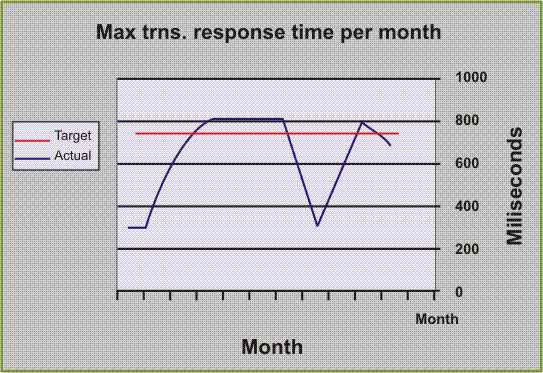
Any transaction that exceeds the target will be regarded as a breach of contract, but as a base for understanding the actual quality of service provided it is very poor, as it only reflects a single transaction and nothing is known regarding the rest of the transactions, such as, was it a single failure or a trend? If it was not an isolated incident, then how many failures were there, or what is the ratio of failed transactions to the total number of transactions performed during the month? There may be a number of months with such occurrences and hence a breach of contract, but what is the trend? Is it improving or getting worse? All of these are questions that the Service Level Manager might ask and the report should be able to provide the answers.
Note: When defining the Metric and its associated calculation outline, it is very important to envisage how the results will appear in a report. This report must provide two crucial items:
|
Suggested modeling Solution B |
Average response time |
|
CNP system transaction response time |
Must be no longer than 750 milliseconds per month |
|
Metric |
Average transaction response time |
|
Target |
750 |
|
Tracking period |
1 month |
|
Unit of measurement |
milliseconds |
|
Domain Category |
Average transaction response time |
Calculating the average response time gives a better idea of the monthly quality of service, and yet at the same time is still able to reflect those months with extreme or out-of-contract response times.
|
Suggested modeling Solution C |
Percentage of transactions that were successfully completed under the threshold. |
|
CNP System Transaction response time |
Must be no longer than 750 milliseconds per month |
|
Metric |
Successful transaction response time |
|
Target |
100 |
|
Tracking period |
1 month |
|
Unit of measurement |
% of success |
|
Metric parameter |
750 ms |
|
Service |
CNP System |
|
Service Domain |
Performance |
|
Domain Category |
Successful transaction response time |
|
Timeslot |
Always |
Using this method, the calculation will be the percentage of transactions that were successfully completed under the threshold of 750 ms during the specified period, given by the formula:
((Number of transactions under 750ms.)/(Total Number of transactions))*100
Expressing the guarantee as a success rate provides the ability to retain a strict guarantee (target 100%), whilst it also allows for the actual value representing how good or bad the service was.
Using this method, the target is now not an upper limit of 750 ms, but is the ratio to be maintained. In cases where the guarantee must be strict, then the target should be 100% which leaves no place for even a single failure. Note that in this case, an additional variable has been introduced, the Metric Parameter. This parameter should be implemented as a Metric parameter to enable simple modifications if required.
An alternative model to this method may be the forcing of an escalation type model:
The following solutions defines three Metrics instead of a single Metric, as in the previous solutions.
|
Metric |
Successful transaction response time |
|
Target |
95 |
|
Tracking period |
1 month |
|
Unit of measurement |
% of success |
|
Metric parameter |
750 ms |
|
Metric |
Successful transaction response time |
|
Target |
99 |
|
Tracking period |
1 month |
|
Unit of measurement |
% of success |
|
Metric parameter |
850 ms |
|
Metric |
Successful transaction response time |
|
Target |
100 |
|
Tracking period |
1 month |
|
Unit of measurement |
% of success |
|
Metric parameter |
1000 ms |
In a case where it is necessary to report the contractual obligation, as well as the number of transactions that exceed the threshold of 750 ms, you need to define an additional Metric to count the number of failed transactions.
Note: Each Metric generates a single result over a given time period. If it is set to calculate the percentage of transactions, it cannot provide the number of transactions as well.
The only way to produce additional reports from a Metric is to use the outputs from the Business Logic. (Refer to Outputs - User Tables that discusses outputting results from the Business Logic).
|
Metric |
Number of Failed Transactions |
|
Target |
No target |
|
Tracking period |
1 month |
|
Unit of measurement |
Number of transactions |
|
Metric Parameter |
750ms |
|
Service |
CNP System |
|
Service Domain |
Performance |
|
Domain Category |
Number of transactions |
|
Timeslot |
Always |
|
Copyright © 2012 CA.
All rights reserved.
|
|