

|
|
|
只要所需结果为事件间隔的时间期间的函数,则本节中介绍的设计模式均适用,例如:
对于累积时间,必须分配一个能够累积时间(以秒为单位)的变量,并实施函数来检查条件以及自上次更新后累积经过的时间。 然后,将针对该公式中接收的每个事件执行此函数。
下图描绘了时钟处理时间累积过程。
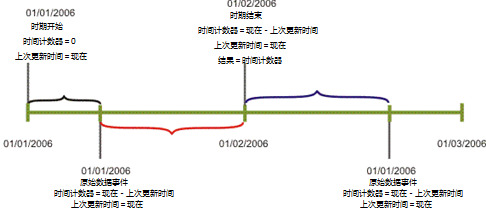
LastUpdateTime 变量存储上次执行更新的时间,而不管是否更新了时间计数器。 该函数包含用于决定是否需要更新并累积时间的条件。 例如,如果超出了时间段期间,系统状态为“停机”或事件具有未决状态,则相关的时间都不应考虑在内。
虽然此处详细介绍的情况通常使用 Tools.NetTime() 函数来计算持续时间,但在某些情况下可能最好首选标准 VB 函数 DateDiff()。
Tools.NetTime 函数会在每次使用它检查时间段时产生开销。 建议避免在数据事件过程中使用 NetTime,因为任何新传入的事件都会调用这些过程,并因此进行 NetTime 调用。 如果您的时间段为 24/7,建议使用 DateDiff 函数,以避免检查时间段所产生的开销。
示例 1:
以下“UpdateCounters”例程累积 PeriodNetTime 变量中的总时间段。 在 AvailabilityTime 中,例程将累积系统状态为“运行”(表示系统可用)的时间。
Tools 对象包含 NetTime 方法 - NetTime(beginTime, endTime)0。 此方法可返回当前度量标准的时间段内 beginTime(开始时间)和 endTime(结束时间)之间的秒数。 在这两个变量之间的任何时间均是时间段内要排除的部分,因此,在使用时间段的持续时间计算中非常常用。 (例如:对于在 4 小时的营业时间内解决的优先级 1 故障单,尽管故障单是在工作日结束时引发的,且可能直到第二天早上才能解决,但由于该时间段小时已排除在外,所以仍符合 SLA 的要求。)
Sub UpdateCounters (time)
   PeriodNetTime = PeriodNetTime + tools.NetTime (LastUpdateTime, time)
   If SystemStatus = UP Then
      AvailabilityTime = AvailabilityTime + tools.NetTime (LastUpdateTime, time)
   End If
   LastUpdateTime = time
End Sub
示例 2:
以下示例通过处理几个关键组件的运行和停机事件以及这些组件的维护事件,计算应用程序可用性。 如果所有组件正在进行维护,则不会将该时间视为预期的可用性时间。
子例程 UpdateCounters 会在必要时推进时间计数器,并在公式中接收到每个事件(原始数据事件/引擎事件)时执行。 如果时间属于时间段期间,而且组件不在计划的停机期间内,它还将更新预期可用时间。 仅当系统状态也为“运行”时,该公式才会更新实际的可用性时间。
DateDiff 是一个标准 VB 函数,可返回两个日期之间的时间,但不排除任何时间段信息。
'Force variable declaration
Option Explicit

'Global variables
Dim ExpectedAvailabilityTime
Dim ActualAvailabilityTime
Dim LastUpdateTime
Dim AvailabilityIndicators
Dim MonitoredComponents
Dim DowntimeStatuses

'Map objects creation
Set AvailabilityIndicators=CreateObject("SlalomMap.Map")
Set MonitoredComponents=CreateObject("SlalomMap.Map")
Set DowntimeStatuses=CreateObject("SlalomMap.Map")

'After loading and whenever an infrastructure change occurs
Sub OnRegistration(dispatcher)
   dispatcher.RegisterByResourceGroup "OnComponentDownEvent","Component Down","Application Components"
   dispatcher.RegisterByResourceGroup "OnComponentUpEvent","Component Up","Application Components"
   dispatcher.RegisterByResourceGroup "OnMaintenanceStartEvent","Maintenance Start","Application Components"
   dispatcher.RegisterByResourceGroup "OnMaintenanceEndEvent","Maintenance End","Application Components"
   UpdateCounters Context.RegistrationTime

   Dim AllocatedComponents
   Set AllocatedComponents = Context.ResourcesOfResourceGroup("Application Components")

   'make sure formula is monitoring only relevant and all the relevant resources
   UpdateMonitoredComponents AllocatedComponents
End Sub

Sub OnLoad(time)
   'When system goes up for the first time - assume availability OK
   LastUpdateTime = time
End Sub

Sub OnPeriodStart(time)
   'initializing counters to renew periodic calculation
   ExpectedAvailabilityTime = 0
   ActualAvailabilityTime = 0
End Sub

Sub OnTimeslotEnter(time)
   UpdateCounters time
End Sub

Sub OnTimeslotExit(time)
   UpdateCounters time
End Sub

Sub OnComponentDownEvent(eventDetails)
   UpdateCounters eventDetails.Time
   'write availability status of reported-on resource
   AvailabilityIndicators(eventDetails.ResourceId) = _
      AvailabilityIndicators(eventDetails.ResourceId)+1
End Sub

Sub OnComponentUpEvent(eventDetails)
   UpdateCounters eventDetails.Time
   'write availability status of reported-on resource
   AvailabilityIndicators(eventDetails.ResourceId)= _
      AvailabilityIndicators(eventDetails.ResourceId)-1
End Sub

Sub OnMaintenanceStartEvent(eventDetails)
   UpdateCounters eventDetails.Time
   'write availability status of reported-on resource
   DowntimeStatuses(eventDetails.ResourceId)= _
      DowntimeStatuses(eventDetails.ResourceId)+1
End Sub

Sub OnMaintenanceEndEvent(eventDetails)
   UpdateCounters eventDetails.Time
   'write availability status of reported-on resource
   DowntimeStatuses(eventDetails.ResourceId)= _
      DowntimeStatuses(eventDetails.ResourceId)-1
End Sub

Sub OnPeriodEnd(time,isComplete)
   UpdateCounters time
End Sub

Function Result
   If ExpectedAvailabilityTime <> 0 Then
      Result = 100 * (ActualAvailabilityTime / ExpectedAvailabilityTime)
   Else
      Result = Null
   End If
End Function

Sub UpdateCounters(time)
   If Context.IsWithinTimeslot And Not AllComponentsAreInPlannedDowntime Then
      'update counter of seconds in period (when availability is expected)
      ExpectedAvailabilityTime = ExpectedAvailabilityTime + DateDiff("s",LastUpdateTime,time)
      If SystemIsAvailable Then
         'update seconds-of-availability counter
         ActualAvailabilityTime = ActualAvailabilityTime + DateDiff("s",LastUpdateTime,time)
      End If
   End If
   LastUpdateTime=time
End Sub

Sub UpdateMonitoredComponents(allocatedComponents)
   Dim Component
   'add to monitored Components map all new Components to be monitored
   For Each Component In allocatedComponents
      If Not MonitoredComponents.Exist(Component) Then
         MonitoredComponents(Component) = Component
         AvailabilityIndicators(Component) = 0
         DowntimeStatuses(Component) = 0
      End If
   Next

   'remove from monitored Components map all no-longer-relevant Components
   For Each Component In MonitoredComponents
      If Not allocatedComponents.Exist(Component) Then
         MonitoredComponents.Erase Component
         AvailabilityIndicators.Erase Component
         DowntimeStatuses.Erase Component
      End If
   Next
End Sub

Function SystemIsAvailable
   Dim SystemAvailability
   SystemAvailability = True

   Dim Component
   Dim ComponentAvailability
   For Each Component In MonitoredComponents
      ComponentAvailability = AvailabilityIndicators(Component) = 0 _
         Or DowntimeStatuses(Component) > 0
      'system availability is evaluated with availability
      SystemAvailability = SystemAvailability And ComponentAvailability
   Next
   SystemIsAvailable = SystemAvailability
End Function

Function AllComponentsAreInPlannedDowntime
   Dim ComponentsInPlannedDowntime
   ComponentsInPlannedDowntime = 0
   Dim Component
   For Each Component In MonitoredComponents
      If DowntimeStatuses(Component) > 0 Then
         ComponentsInPlannedDowntime = ComponentsInPlannedDowntime + 1
      End If
   Next

   If ComponentsInPlannedDowntime = MonitoredComponents.Count Then
      AllComponentsAreInPlannedDowntime = True
   Else
      AllComponentsAreInPlannedDowntime = False
   End If
End Function
| 版权所有 © 2012 CA。 保留所有权利。 | 就该主题发送电子邮件至 CA Technologies |