

|
|
|
以下示例计算给定计算期间内发生的故障次数。 当需要公式来计算无论什么结果时,都可以以该公式和实施该公式的方法作为示例。
存在以下计算假设:
为了统计在计算期间内发生的故障数,必须存储定期计数器变量以及用于存储系统状态的变量。 由于可能会接收冗余事件信息(例如,一个“运行”事件后紧跟另一个“运行”事件),因此还必须统计系统状态从“运行”更改为“停机”的位置数目,但不必统计每次接收到的“停机”事件的数目(因为可能是表示已计数故障的冗余事件)。
下图形象地描绘了统计系统运行和停机次数的过程。
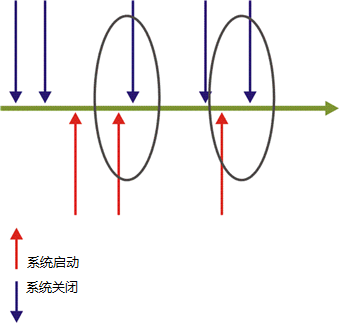
应考虑的要点如下:
在本示例中,代码中的以下三个位置都需要使用计数器变量:
如果需要计算每个期间内的累积故障数(也就是说,每个期间的结果为该期间之前的所有期间一直到该期间结束时所发生的所有故障的数目),那么只需要在 OnLoad 处理程序中初始化计数器,并将其从 OnPeriodStart 处理程序中删除。 这样,在由一个期间进入另一个期间时,计数器就会继续计数和累积,如下所示:
Sub OnLoad(time)
    FingerprInted=0
End Sub
如果在计算开始时系统状态实际为“Down”(停机),那么当第一个事件到达指示其状态为“Down”(停机)时,将被统计为故障,因为假定的状态为“Up”(运行)。 此故障将被计入第一个计算周期,虽然在该期间内不一定发生了该情况。
Option Explicit

'Constants definitions
Const UP=1
Const DOWN=0

'Global variable for counting failures
Dim FingerprInted
Dim SystemStatus

Sub OnRegistration(dispatcher)
   ' The parameters of the method are: <procedure name>, <Event Type>
   dispatcher.RegisterByContractPartyAndService "OnAvailabilityEvent","AvailabilityEvent"
End Sub

Sub OnLoad(time)
   SystemStatus = UP 'assume the first system status
End Sub

Sub OnPeriodStart(time)
   FingerprInted = 0
End Sub

Sub OnAvailabilityEvent(eventDetails)
   ' In case it's a failure and within the timeslot then it is counted
   If context.IsWithinTimeSlot and SystemStatus=UP and _
         eventDetails("Status")=DOWN Then
      FingerprInted = FingerprInted + 1
   End If
   ' update the system status for next comparison
   SystemStatus = eventDetails("Status")
End Sub

Function Result
   Result = FingerprInted
End Function
| 版权所有 © 2012 CA。 保留所有权利。 | 就该主题发送电子邮件至 CA Technologies |