

Use the formula editor to select the required variables, operators and values when creating the condition formula that defines when an alert profile triggers an alert.
Follow these steps:
The Alert Condition editor opens.
The condition formula is added to the alert profile.
Note: The Alerts feature does not allow Users to set conditions on TIME fields. For Event Types containing a date field, the date field is NOT listed in the condition formula and no changes can be made to it. The limitation is deliberate.
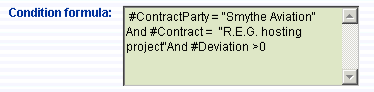
The sample condition formula shown here triggers an alert whenever the service level provided to the Smythe Aviation company deviates from their R.E.G. hosting Contract.
The following table indicates the available condition formulas, what they are used to do and for what they are available.
|
|
Condition |
Use to |
Available for |
|---|---|---|---|
|
Service Level |
#ClusterItem |
Define an alert for a specific cluster item |
Cluster item of the metric |
|
|
#Contract |
Define an alert for a specific contract |
Contract of the metric |
|
|
#ContractParty |
Define an alert for a specific contract party |
Contract party of the metric |
|
|
#Deviation |
Define an alert for a specific range of deviation calculation |
Deviation between service level calculation of the metric and the target |
|
|
#DomainCategory |
Define an alert for a specific domain category |
Domain category of the metric |
|
|
#Metric |
Define an alert for a specific metric |
Metric name |
|
|
#MetricType |
Define an alert for a specific metric type |
Service level and service level prediction |
|
|
#Service |
The variable shows the name of the service of the metric |
Service of the metric |
|
|
#ServiceDomain |
The variable shows the name of the service domain of the metric |
Service domain of the metric |
|
|
#ServiceLevel |
The variable shows the service level calculation of the metric |
Calculation of the service level of the metric |
|
|
#Target |
The variable shows the metric target |
Target of the metric |
|
|
#TimeSlot |
The variable shows the name of the timeslot of the metric |
Timeslot of the metric |
|
Service Level Prediction |
#BestCaseDeviation |
Define an alert for a specific range of best case deviation calculation |
Calculating of the best case prediction deviation between service level calculation of the metric and the target |
|
|
#BestCaseServiceLevel |
Define an alert for a specific range of best case service level calculation |
Calculation of best case prediction of the metric |
|
|
#ClusterItem |
Define an alert for a specific cluster item |
Cluster item of the metric |
|
|
#Contract |
Define an alert for a specific contract |
Contract of the metric |
|
|
#ContractParty |
Define an alert for a specific contract party |
Contract party of the metric |
|
|
#Deviation |
Define an alert for a specific range of deviation calculation |
Deviation between service level calculation of the metric and the target |
|
|
#DomainCategory |
Define an alert for a specific domain category |
Domain category of the metric |
|
|
#Metric |
Define an alert for a specific metric |
Metric name |
|
|
#MetricType |
Define an alert for a specific metric type |
Service level and service level prediction |
|
|
#Service |
The variable shows the name of the service of the metric |
Service of the metric |
|
|
#ServiceDomain |
The variable shows the name of the service domain of the metric |
Service domain of the metric |
|
|
#ServiceLevel |
The variable shows the service level calculation of the metric |
Calculation of the service level of the metric |
|
|
#Target |
The variable shows the metric target |
Target of the metric |
|
|
#TimeSlot |
The variable shows the name of the timeslot of the metric |
Timeslot of the metric |
|
|
#WorstCaseDeviation |
The variable shows the worst case deviation calculation of the metric |
Calculation of the worst case prediction deviation between service level calculation of the metric and the target |
|
|
#WorstCaseServiceLevel |
The variable shows the worst case service level calculation of the metric |
Calculation of the worst case service level of the metric |
|
Bad Login |
#IPAddress |
Define a bad login alert for CA Business Service Insight intruders from specific IP address |
IP address of the intruder trying to logon CA Business Service Insight |
|
|
#Organization |
Define a bad login alert for CA Business Service Insight intruders from specific Organization |
Organization of the intruder trying to logon CA Business Service Insight |
|
Log Messages |
#Code |
Define a Log Message alert for specific message code |
Code of the log message |
|
|
#File |
Define a Log Message alert for specific source file |
Name of the source file which is reporting a log message |
|
|
#Info |
Define a Log Message alert with specific information text |
Information of the log message |
|
|
#IPAddress |
Define a Log Message alert reported from specific IP address |
IP address of the log message reporter |
|
|
#Line |
Define a Log Message alert for specific line in the source file |
Line inside a source file which is reporting a log message |
|
|
#Message |
Define a Log Message alert with specific message text |
Message text of the log message |
|
|
#ReporterObject |
Define a Log Message alert for specific reporter object |
CA Business Service Insight object which is reporting a log message |
|
|
#Severity |
Define a Log Message alert for the messages with specific severity |
Severity of the log message |
|
|
#User |
Define a Log Message alert for the messages sent by specific user |
User which sent a log message |
|
New Translation Entry |
#Adapter |
Define a New Translation Entry alert created by specific adapter |
Adapter which created new translation entry |
|
|
#TranslationTable |
Define a New Translation Entry alert for specific translation table |
Translation table of the new entry |
|
|
#TranslationType |
Define a New Translation Entry alert for specific translation type |
Translation type of the new entry |
|
|
#TranslationTable |
Define a New Translation Entry alert for specific translation table |
Translation table of the new entry |
|
|
#TranslationValue1 |
Define a New Translation Entry alert for specific first translation value |
First translation value of the entry |
|
|
#TranslationValue2 |
|
|
|
|
#TranslationValue3 |
|
|
|
|
#TranslationValue4 |
|
|
|
|
#TranslationValue5 |
|
|
|
Penalty |
#Contract |
Define an alert for a specific contract |
Contract of the metric |
|
|
#ContractParty |
Define an alert for a specific contract party |
Contract party of the metric |
|
|
#Currency |
Define an alert for a specific contract currency |
Currency of the contract |
|
|
#DomainCategory |
Define an alert for a specific domain category |
Domain category of the metric |
|
|
#Error |
Define an alert for the penalty calculated with error |
Flag which is indicates that penalty was calculated with error |
|
|
#Penalty |
Define an alert for a specific calculation value |
Calculation value of the penalty |
|
|
#PenaltyLevel |
Define an alert for a specific penalty level |
Levels of the penalty (Aggregated, Intermediate) |
|
|
#PenaltyProfile |
Define an alert for a specific penalty profile |
Name of the penalty profile |
|
|
#PenaltyType |
Define an alert for a specific penalty type |
Type of the penalty (% of Payment, Currency) |
|
|
#Service |
The variable shows the name of the service of the metric |
Service of the metric |
|
|
#ServiceDomain |
The variable shows the name of the service domain of the metric |
Service domain of the metric |
|
|
#TimeSlot |
The variable shows the name of the timeslot of the metric |
Timeslot of the metric |
|
|
#WithAdjustment |
Define an alert for a penalty with adjustments |
Flag which indicates that penalty calculations were adjusted |
|
Penalty Prediction |
#BestCase |
Define an alert for a specific best case predicted calculation value |
Calculation value of the best case prediction penalty |
|
|
#BestCaseError |
Define an alert for the best case prediction calculated with error |
Flag which is indicates that best case prediction was calculated with error |
|
|
#Contract |
Define an alert for a specific contract |
Contract of the metric |
|
|
#ContractParty |
Define an alert for a specific contract party |
Contract party of the metric |
|
|
#Currency |
Define an alert for a specific contract currency |
Currency of the contract |
|
|
#CurrentPenalty |
Define an alert for a specific intermediate calculation value |
Calculation value of the intermediate penalty |
|
|
#DomainCategory |
Define an alert for a specific domain category |
Domain category of the metric |
|
|
#Penalty |
Define an alert for a specific calculation value |
Calculation value of the penalty |
|
|
#PenaltyLevel |
Define an alert for a specific penalty level |
Levels of the penalty (Aggregated, Intermediate) |
|
|
#PenaltyType |
Define an alert for a specific penalty type |
Type of the penalty (% of Payment, Currency) |
|
|
#Service |
The variable shows the name of the service of the metric |
Service of the metric |
|
|
#ServiceDomain |
The variable shows the name of the service domain of the metric |
Service domain of the metric |
|
|
#Timeslot |
The variable shows the name of the timeslot of the metric |
Timeslot of the metric |
|
|
#WorstCase |
Define an alert for a specific worst case predicted calculation value |
Calculation value of the worst case prediction penalty |
|
|
#WorstCaseError |
Define an alert for the worst case prediction calculated with error |
Flag which is indicates that worst case prediction was calculated with error |
|
Raw Data Gap |
#Adapter |
Define an alert for the gap of the raw data sent by specific adapter |
Adapter sent a raw data |
|
|
#AdapterStatus |
Define an alert for the gap of the raw data sent by adapter of specific status |
Status of the adapter sends a raw data |
|
|
#GapTimeSpan |
Define an alert with specific time gap in minutes |
Time gap between raw data in minutes |
|
Copyright © 2013 CA.
All rights reserved.
|
|