

The Custom tab enables you to perform report calculations in defined steps by using a specific operation (average, sum, minimum, maximum or count) on each field that was not defined in the Criteria tab of the Report Wizard. Custom aggregation reporting options, enable you to emphasize some data and to de–emphasize other data by filtering out selected fields, and then performing operations on the remaining data in a defined order.
Note: The Custom tab is enabled only when Custom is selected as the aggregation type in the Criteria tab.
To define custom aggregation options
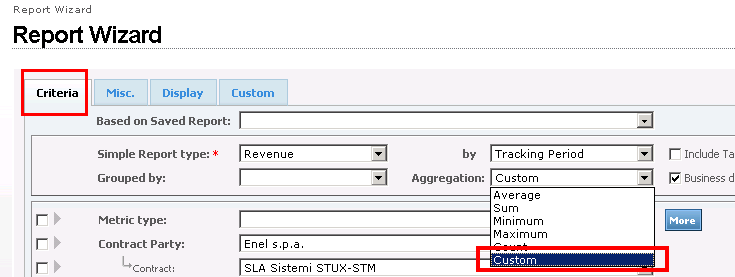
Note: The dimension Time must always be selected as part of the first step. Any dimension may be used for subsequent steps.
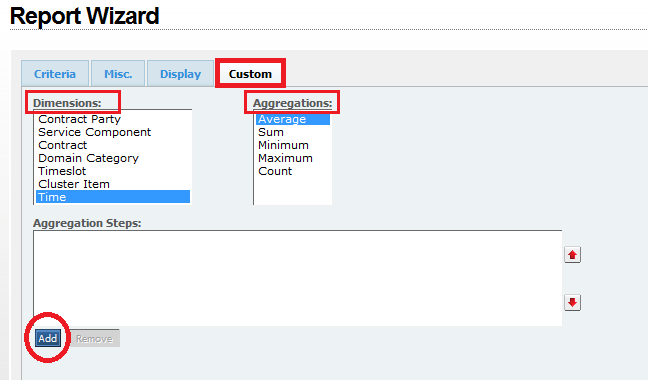
The combination step of Aggregation+Dimension displays in the Aggregation Steps pane and the dimension will be removed from the Dimensions list.
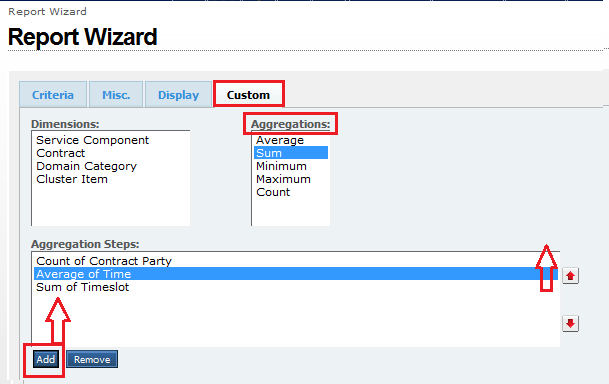
Note: You can change the order of the calculation steps placed into in the Aggregation Steps pane field by selecting a value in the Aggregation Steps pane and clicking the up or down arrow (on the right side of the text area).
Note: If you selected an incorrect or wrong operation for a particular step, remove the step from the Aggregation Steps by selecting it and clicking Remove.
Note: The Dimensions parameters available are those that were not defined in the Report Wizard criteria.
|
Copyright © 2013 CA.
All rights reserved.
|
|