

Supplies information about the calculated metric, as follows:
Returns the name of the current cluster item (if the current metric is clustered) or an empty string (if the current metric is not clustered).
Returns the ID of the current cluster item (if the current metric is clustered) or 0 (if the current metric is not clustered).
Returns the size of the cluster for clustered metrics. If the metric is not clustered, then it returns 1.
Returns the name of the unit of consumption of the current metric, as defined in the metric details page. The unit itself is defined in Design, Foundation Entities, Units. This value can be left unset, in which case an empty string is returned. This value is part of the 'Metric Types'feature.
Example:
Dim Unit
Unit = Context.ConsumptionUnit
Returns the symbol of the unit of measurement of the current metric, as defined in the metric details page. The unit itself is defined in Design, Foundation Entities, Units. This value can be left unset, in which case an empty string is returned. This value is part of the 'Metric Types' feature.
Example:
Dim Sym
Sym = Context.MeasurementUnitSymbol
The name of the contract that contains the metric that generated the event. If an adapter generated the event, then an empty string is returned.
Returns the date from which the contract (not only the current version) is effective.
Returns the date until which the contract (not only the current version) is effective.
The ID of the contract that contains the metric that generated the event. If an adapter generated the event, the property value is 0.
The name of the contract party which owns the contract. This contract contains the metric that generated the event. If an adapter generated the event, an empty string is returned.
The ID of the contract party which owns the contract. This contract contains the metric that generated the event. If an adapter generated the event, the property value is 0.
Returns the value of the current contract type, as defined in the 'general' page of the 'contract details' page. (This value is part of the 'End to end' feature).
Example:
Dim CType
CType = Context.ContractType
Returns True if the current calculation takes corrections into account.
Returns True if there are no corrections. The current calculation is performed for both the WithCorrections and WithoutCorrections modes.
Returns the domain category relation (NMT or NLT), as defined in the domain category details, for the metric.
Returns a string containing the contents of the context object in a readable format.
Returns the name of the last event handler that was called in the script from outside the script. Possible values include:
Any other function that was called as a result of an event.
Returns True if the current calculation takes exceptions into account.
Returns True if there are no exceptions. The current calculation is performed for both the WithExceptions and WithoutExceptions modes.
Returns a map of the Price Per Unit table that is defined in the metric details page. This map allows the user to look up price values from the table for business logic use. This map is part of the Financial Module feature.
Example:
Dim PPUMap
Set PPUMap = Context.Field("Price Per Unit")

For Each element in map
   x = element
Next
Returns the name of the formula.
Returns the ID of the formula.
Returns a map of maps that during runtime, gives you a list of the registrations defined in the current calculating metric.
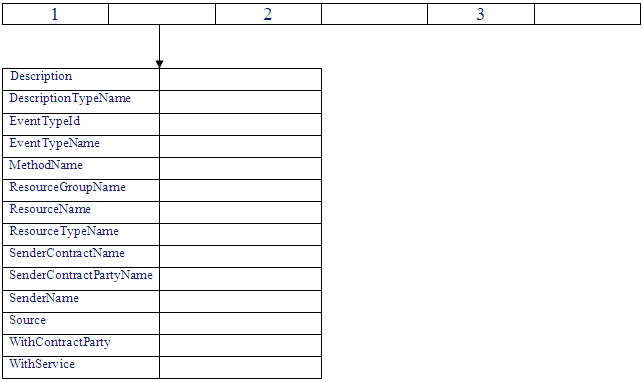
Note: The high-level map is just a container that holds the maps that actually hold the registration information.
Example:
Dim rMap
Set rMap = Context.GetRegistrations
Returns a Boolean of whether the current metric has an associated service (some metric types, such as KPI have no service). (This value is part of the Serviceless Metrics feature).
Example:
Dim WithService
WithService = Context.HasService
The interval length (in the units found in the TimeUnit property) of the calculation that generated the event. If an adapter generated the event, then this property contains 0. If a metric generated the event, but not by its tracking period calculation, then the value of this property is always 1. If the tracking period of the metric generated the event, then its value is the number of TimeUnits in the tracking period.
Returns a Boolean of whether the current calculation is being done for the metric forecast. (This value is part of the Forecast feature).
Example:
Dim Forecasting
Forecasting = Context.IsForecast
Returns a Boolean of whether the current metric is dynamic. This value is part of the Dynamic Target feature.
Example:
Dim IsDynamic
IsDynamic = Context.IsTargetDynamic
If the calculation of the tracking period of some metric sent the event, then this value is true. If the adapter sent the event, then this value is false.
Returns True if the event occurred during the TimeSlot of the metric.
Returns the value of the current metric Main indicator, as defined in the metric details page. This value is part of the 'Metric Types' feature.
Example:
Dim Indicator
Indicator = Context.MainIndicator
Returns True if Exceptions Apply or ExceptionsFolded are True and CorrectionsApply or CorrectionsFolded are True. In other words, MainMode returns True if the current calculation applies to both WithCorrections mode and WithExceptions mode.
Returns the name of the unit of measurement of the current metric, as defined in the metric details page. The unit itself is defined in Design, Foundation Entities, Units. If this value is left unset, then an empty string is returned. This value is part of the 'Metric Types' feature.
Example:
Dim Unit
Unit = Context.MeasurementUnit
Returns the symbol of the unit of measurement of the current metric, as defined in the metric details page. The unit itself is defined in Design, Foundation Entities, Units. If this value is left unset, then an empty string is returned. This value is part of the Metric Types feature.
Example:
Dim Sym
Sym = Context.MeasurementUnitSymbol
Returns the last time the OnRegistration procedure was called.
Since OnRegistration, unlike other event handlers, does not include a time parameter, use RegistrationTime to get the current time.
The supplied parameters filter this list of resources:
Similar to ResourcesOfType, except that it returns only those resources to which they are connected:
Example:
Dim map
Set map = Context.Resources "ThisResourceGroup", "ThisResourceType", True, False, #1/1/2006 12:45:00#
Returns the display name of a resource for a given resource ID.
Example:
Dim resourceDisplayNameById
resourceDisplayNameById = context. resourceDisplayNameById(1000)
Returns the display name of a resource for a given resource name.
Example:
Dim resourceDisplayNameByName
resourceDisplayNameByName = context. resourceDisplayNameByName("London")
Similar to ResourcesOfType, except that this method returns only those resources that are connected to the contract party of the current contract now.
Similar to ResourcesOfType, except that it returns only those resources that are connected to the contract party of the current contract at the specified time.
Example:
Dim map
Set map = Context.ResourcesOfContractParty
"ThisResourceType", #1/1/2006 12:45:00#
Similar to ResourcesOfType, except that this method returns only those resources that are:
Similar to ResourcesOfType, except that it returns only those resources that are:
Example:
Dim map
Set map = Context.ContractPartyAndService "ThisResourceType", #1/1/2006 12:45:00#
Similar to ResourcesOfType, except that it returns only those resources that are connected to:
Example:
Dim map
Set map = Context.ResourcesOfResourceGroup "ThisResourceGroup", "ThisResourceType", #1/1/2006 12:45:00#, True
Similar to ResourcesOfType, except that this method returns only those resources that are connected to the service of the current contract now.
Similar to ResourcesOfType, except that this method returns only those resources contained (both directly and indirectly) in the defined resource group now.
Similar to ResourcesOfType, except that it returns only those resources contained (both directly and indirectly) in the defined resource group at the specified time.
Example:
Dim map
Set map = Context.ResourcesOfService
"ThisResourceGroup", "ThisResourceType", #1/1/2006 12:45:00#
Similar to ResourcesOfType, except that it returns only those resources that are connected to the service of the current contract at the specified time.
Example:
Dim map
Set map = Context.ResourcesOfService
 "ThisResourceType", #1/1/2006 12:45:00#
All these functions have a new optional parameter called time. If the parameter is not specified, the current time is used.
Returns a Map of resource IDs. Each entry in the returned Map includes the key and the value that is set to the resource ID.
Example:
Dim map
Set map = Context.ResourcesOfType "ThisResourceType", #1/1/2006 12:45:00#
Similar to ResourcesOfType, except that it returns only those resources that are connected to the contract party of the current contract at the specified time.
Example:
Dim map
Set map = Context.ResourcesOfContractParty
 "ThisResourceType", #1/1/2006 12:45:00#
Similar to ResourcesOfType, except that it returns only those resources that are connected to the service of the current contract at the specified time.
Example:
Dim map
Set map = Context.ResourcesOfService
 "ThisResourceType", #1/1/2006 12:45:00#
Similar to ResourcesOfType, except that it returns only those resources contained (both directly and indirectly) in the defined resource group at the specified time.
Example:
Dim map
Set map = Context.ResourcesOfService
 "ThisResourceGroup", "ThisResourceType", #"1/1/2006 12:45:00#
Similar to ResourcesOfType, except that it returns only those resources that are connected to the service:
Example:
Dim map
Set map = Context.ContractPartyAndService "ThisResourceType", #1/1/2006 12:45:00#
Similar to ResourcesOfType, except that it returns only those resources that are connected:
Example:
Dim map
Set map = Context.ResourcesOfResourceGroup "ThisResourceGroup", "ThisResourceType", #1/1/2006 12:45:00#, True
The supplied parameters filters this list of resources:
Example:
Dim map
Set map = Context.Resources "ThisResourceGroup", "ThisResourceType", True, False, #1/1/2006 12:45:00#
Returns the name of a resource or resource group for a specific resource ID.
Example:
Dim MyResourceName
MyResourceName = Context. ResourceNameById (1234)
Returns the ID for the resource or resource group, with the specified ID.
Example:
Dim MyResourceId
MyResourceId = Context. ResourceIdByName (“MyResource”)
Returns the name of the metric.
Returns the ID of the metric.
Returns the time unit of the tracking period of the metric. If the tracking period of the metric is a month and the current time unit is a year, then the returned value is a month.
Returns the name of the service.
Returns the ID of the service.
Returns the target of the metric or null if the metric does not have a target.
Returns the red threshold value that was set in the Thresholds tab of the metric. If no value was set, -1 is returned.
Example:
Dim RedThreshold
RedThreshold = Context.ThresholdRed
Returns the yellow threshold value that was set in the Thresholds tab of the metric. If no value was set, -1 is returned.
Example:
Dim YellowThreshold
YellowThreshold = Context.ThresholdYellow
Returns the value of the last event (both raw data and metric event) sent to the business logic. In other words, it returns the timestamp of the event that caused the execution of the current line that contains the call to this property. This value is part of the 'Event Reusability' feature.
Example:
Dim EventTime
EventTime = Context.TimeOfLastEvent
Returns the name of the TimeSlot.
Returns the ID of the TimeSlot.
Returns the description of the timeslot that the metric uses. If the description field is empty, the returned value is the timeslot name.
If the event generated the metric, then this property contains the time unit of the calculation. This value can be: “HOUR”, “DAY”, “WEEK”, “MONTH”, “QUARTER”, “YEAR”. This value can also be an empty string, which means that an adapted generated the event.
|
Copyright © 2013 CA.
All rights reserved.
|
|