Implementation Guide › Adapter Configuration Specifications › InputFormatCollection Section
InputFormatCollection Section
This section specifies the structure of data retrieved from data source-how a data row is to be cut into fields and what are the field types and formats. Initial data filtering and data manipulations may be performed in this section by using InputFormatSwitch and Compound fields respectively.
The general work-flow of this section is as follows:
- Data row is matched against one or more InputFormats.
- Data is dissected into fields following the matching InputFormat specification.
- Compound fields are assigned values by combining and breaking data fields.
- Processed data is checked against TranslatorSwitch conditions.
- Processed data is sent to matching Translator or ignored.
The InputFormatCollection node may contain one or more InputFormat nodes.
XML Structure:
<InputFormatCollection>
	<InputFormat InputFormatName="MyInputFormat">
	<InputFormatFields>
		<InputFormatField Name="sid_id" Type="string"/>
		<InputFormatField Name="content" Type="string"/>
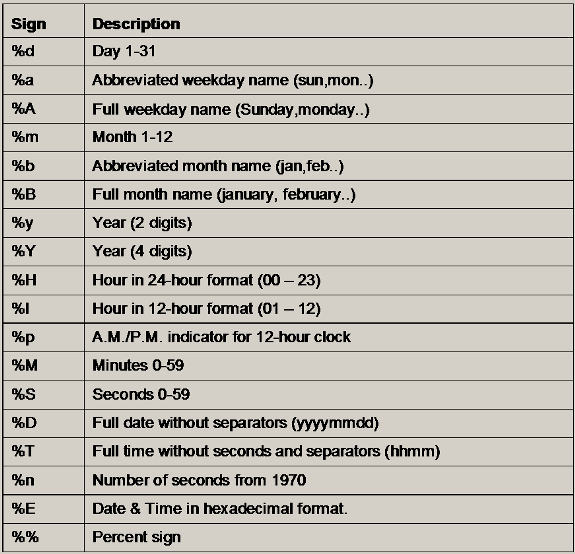
		<InputFormatField Name="date" Type="time"
               TimeFormat="%d/%m/%Y %H:%M:%S"/>
		<InputFormatField Name="server" Type="string"
               Source="compound">
		<Compound>
			<Segment SourceField="content"
                     RegularExpression=".*Job server: ([^\n]+).*" />
		</Compound>
		</InputFormatField>
	</InputFormatFields>
<TranslatorSwitch DefaultTranslator="GeoTranslator">
	<TranslatorCase  TranslatorName="NonGeoTranslator" Break="yes">
		<Condition SourceField="routing_info" Operator="EQ"
             Value="cnano"/>
	</TranslatorCase>
</TranslatorSwitch>
</InputFormat>
</InputFormatCollection>
- InputFormat:
- InputFormatName-Any name for this format, to be referred to by DataSourceInterface section.
- RequiredFields-(optional) Minimum number of fields expected to be found in a data row. A row containing fewer fields is ignored, and an error is logged.
- InputFormatFields-The InputFormatFields may contain one or more Field nodes according to the number of input fields in the data source.
- Compound-Required when source=compound. Specifies field manipulations to be collected into a compound field.
- Segment - Specifies a field manipulation to be added to the created compound. Only the SourceField attribute is required.
- SourceField-Field to be based on. The referred field should be already defined.
- RegularExpression-Manipulating regular expression.
- MatchCase-(optional) [yes/no] Define if the regular expression matching is case sensitive.
- SelectionStart-Text extraction start position, starting from 0.
- SelectionLength-Text extraction size.
- Prefix-A string to be prefixed to the manipulation result.
- Suffix-A string to be suffixed to the manipulation result.
- XpathExpression-Manipulating xpath expression.
- InputFormatSwitch-Used to specify format criteria, when data rows come in more than one format.
Note: When using InputFormatSwitch, the order of InputFormat nodes is important-a referred InputFormat should be already defined.
DefaultInputFormat-Specifies the name of InputFormat to be routed to, in case no criteria is matched
- InputFormatCase-Specifies a criteria to be tested on data rows to determine to which InputFormat it should be routed.
- InputFormatName-The InputFormat to be used when the criteria is matched.
- LogicOperator-(optional) [and/or].
- and- All conditions must be matched. (the default).
- or- At least one condition should be matched
- Condition-Condition to be tested on a data row to determine its format.
SourceField-Field to be tested.
Operator-Test type, of the following options:
- EQ-Equal to
- NE-Not equal to
- GT-Greater then
- LT-Less then
- GE-Greater or equal to
- LE-Less or equal to
- MATCH-A regular expression should be matched
- UNMATCH-A regular expression should not match
ValueType-(optional) [constant/field/previousValue]
- constant-Content of the Value attribute is constant regardless to the source data
- field-Cntent of the Value attribute is name of field from the same record.
- previousValue-Content of the Value attribute is name of field from the previous record in the same query with the same input format.
Value-Value to be matched, or a regular expression.
MatchCase-(optional) [yes/no] Define if the testing is case sensitive. When set to "yes" the two values translated to lower case before the test.
- TranslatorSwitch-Determines which Translator is to be used to translate the data row into an CA Business Service Insight Unified Event.
- DefaultTranslator-Translator to be used in case no criteria are matched. If the value is Ignore, no Translator is used and the line is ignored.
- TranslatorCase-Specifies criteria to be tested on processed data to determine to which Translator it should be routed.
Break [yes|no]
yes - (default) If the criteria are matched, do not check next criteria.
no - At any case, after evaluating the criteria and operating the Translator if matched, roceed to the next criteria.
LogicOperator-(optional) [and/or].
- and - All conditions must be matched. (the default).
- or - At least one condition should be matched.
TranslatorName-The translator to redirect to if the conditions are met.
Condition-The condition to be tested on processed data to determine the relevant Translator to be used on it. It is the same as the Condition in the InputFormatSwitch.
Copyright © 2013 CA.
All rights reserved.
|
|