

The query detailed below may be used in a free-form report to present the normal distribution of values in a table, as demonstrated in the following chart:
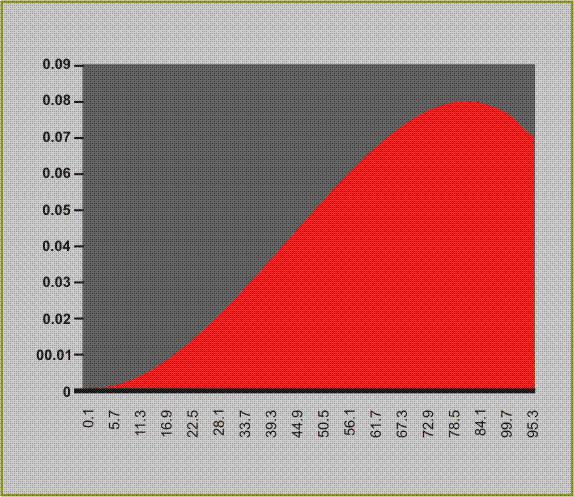
The following parameters are used in the query:
select min (something) min_val,
          max (something) max_val,
          avg (something) avg_val,
          stddev (something) stddev_val
from table_name
x_val is required. This query provides the values for which the distribution is analyzed.
Again, the query may be run against the source data, or T_SLALOM_OUTPUTS for the best results.
The following query will produce the graph as shown above:
select (max_val-min_val)/@Buckets*serial,
     (1/stddev_val*sqrt (2*3.14159265359))*exp ( -1/(2*power (stddev_val, 2))*power (((max_val-min_val)/@Buckets*serial-avg_val), 2))
from     (
          @Query
     ),
     (
          select     rownum serial
          from	t_psl
          where	rownum < @Buckets
     )
order by serial
Its corresponding XML parameters:
<custom>
     <connection>
          <params/>
          </connection>
     <query>
          <params>
               <param name="@Query" disp_name="Data Type" type="LIST">
                    <value>PDP Context Activation Success</value>
                    <list>
                         <item>
<value>
select min(success_rate) min_val,max(success_rate) max_val,avg(success_rate) avg_val,stddev(success_rate) stddev_val
       from PDP_Context_Activation_Success.CSV
</value>
                              <text>PDP Context Activation Success</text>
                         </item>
                         <item>
                              <value>
select min(throughput) min_val,max(throughput) max_val,avg(throughput) avg_val,stddev(throughput) stddev_val
       from [gprs throughput volume by apn.csv]
</value>
                              <text>Throughput in Kb</text>
                         </item>
                         </list>
               </param>
               <param name="@Buckets" disp_name="X Axis Values" type="LIST">
                    <value>100</value>
                    <list>
                         <item>
                              <value>25</value>
                              <text>25</text>
                         </item>
                         <item>
                              <value>50</value>
                              <text>50</text>
                         </item>
                         <item>
                              <value>100</value>
                              <text>100</text>
                         </item>
                         <item>
                              <value>250</value>
                              <text>250</text>
                         </item>
                         <item>
                              <value>500</value>
                              <text>500</text>
                         </item>
                         <item>
                              <value>1000</value>
                              <text>1000</text>
                         </item>
                    </list>
               </param>
          </params>
     </query>
</custom>
|
Copyright © 2013 CA.
All rights reserved.
|
|