

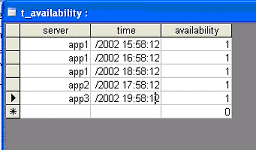
Given an MS Access (.mdb) database with the following table:
The only difference in the configuration file in a SQL Adapter configuration file and the file Adapter configuration file is the DatasourceInterface section.
The DatasourceInterface section in a file Adapter stores the Files collection, where the SQL Adapter file has the ConnectionString and QueryCollection.
The main difference between the two configuration files is in the retrieval and parsing method. The rest of the file is the same.
The SQL interface defines the connection to the database and the queries used to retrieve the data.
Details are as follows:
Note: The section is defined based on the above data source database.
ConnectionString: Connection string for accessing the source DataBase.
The ConnectionString can be defined in the DataSourceInterface element and/or in the Query elements. The ConnectionString definition in the DataSourceInterface element is the default and is used only in a query without a ConnectionString definition. This allows the Adapter to connect to several databases where each query can have its own connection string. For more details on the connection string mechanism, refer to the following section.
Query: Specifies the query attributes.
Note: The order of the InputFormat fields has to correspond to the order of the query selected fields.
Note: You must enter the query key fields as the first selected values in the statement.
Note: 'Date' fields often require using special characters to enclose the date itself. The characters needed to identify the field as a date field depend on the data source. The # character, as shown in the figure at the beginning of the section, can be used to wrap the value field in Excel. Other data source however, may require different methods. Refer to Adapter Configuration Specifications for more information.
Example of a query (Excel-based ODBC) that is built with AutoCompleteQuery="yes":
SELECT INC_CLOSE_DATE, INCIDENT_REF, Severity, `Resolve Time`, `Date Logged`, `Date Resolved` FROM `AllCalls$` WHERE INC_CLOSE_DATE>CDate('7/03/2005 13:06:21') order by INC_CLOSE_DATE
This select statement must be executable on the target DB on which the query is running. This may differ between sources and the ODBC drivers used to connect to them. For example, in Oracle you could select the values from the special 'dual' table (select 'aaa', '1-jan-1970' from dual) , but in Excel you can just select the values directly without a table. (select 'aaa')
Following is a complete configuration file in XML layout:
<?xml version="1.0" encoding="utf-8"?>
<AdapterConfiguration>
  <General MajorVersion="3" MinorVersion="0" RunOnce="yes" LogDebugMode="yes" ConsoleDebugMode="yes" WorkingDirectoryName="d:\Oblicore\Training Kit\Exercises\Adapters\SQL Adapters\Ex1\Solution">
      <DataSourceDifferenceFromUTC DefaultOffset="1" TimeFormat="%Y/%m/%d-%H:%M:%S"/>
   </General>
   <OblicoreInterface Mode="online">
      <OnlineInterface Port="2000" SecurityLevel="none"/>
   </OblicoreInterface>
   <DataSourceInterface>
      <ConnectionString>

          Driver={Microsoft Access Driver (*.mdb)};Dbq=d:\Oblicore\Training Kit\Exercises\Adapters\SQL Adapters\Ex1\db1.mdb;

      </ConnectionString>
      <QueryCollection>
         <Query QueryName="Query" InputFormat="InputFormat" SleepTime="5">
            <SelectStatement AutoCompleteQuery="yes">

               select time,server,availability from t_availability

          </SelectStatement>
            <QueryKeyFields>
               <KeyField Name="time" Sort="asc" ValueLeftWrapper="#" ValueRightWrapper="#"/>
               <KeyField Name="server" Sort="asc"/>
               <SelectInitialValues>

                     select 'AAA','1/1/1970'

               </SelectInitialValues>
            </QueryKeyFields>
         </Query>
      </QueryCollection>
   </DataSourceInterface>
   <InputFormatCollection>
      <InputFormat InputFormatName="InputFormat">
         <InputFormatFields>
            <InputFormatField Name="timestamp" Type="time" TimeFormat="%m/%d/%Y %I:%M:%S %p"/>
            <InputFormatField Name="server" Type="string"/>
            <InputFormatField Name="status" Type="integer"/>
         </InputFormatFields>
         <TranslatorSwitch DefaultTranslator="Translator"/>
      </InputFormat>
   </InputFormatCollection>
   <TranslatorCollection>
      <Translator TranslatorName="Translator">
         <TranslatorFields>
            <TranslatorField Name="ResourceId" SourceType="table" SourceName="ResourceTable"/>
            <TranslatorField Name="EventTypeId" SourceType="constant" ConstantValue="1500"/>
            <TranslatorField Name="Timestamp" SourceType="field" SourceName="timestamp"/>
            <TranslatorField Name="Value" SourceType="field" SourceName="status"/>
         </TranslatorFields>
      </Translator>
   </TranslatorCollection>
   <TranslationTableCollection LoadingMode="remote">
      <TranslationTable Name="ResourceTable" DestinationType="resource">
         <TranslationField>server</TranslationField>
      </TranslationTable>
   </TranslationTableCollection>
</AdapterConfiguration>
|
Copyright © 2013 CA.
All rights reserved.
|
|