

The Translator Collection section defines how the parsed and manipulated data source record extracted in previous sections will be translated into an CA Business Service Insight Event.
This section also defines how to handle duplicate Events and how to use the Event singularity mechanism (for further details see Event Singularity).
When the interface mode is set to online, the CA Business Service Insight Event has a unified structure that contains the following fields:
The structure of the Translator corresponds with the structure of the Event Type within CA Business Service Insight, and also the database table T_RAW_DATA that stores the event as shown in the following figure:
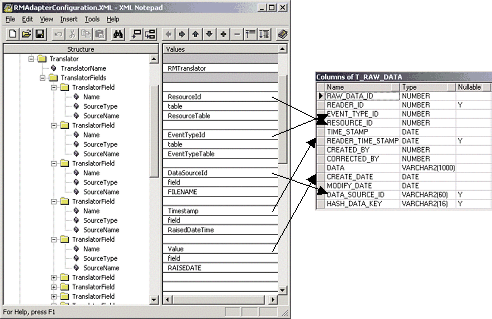
This section also contains the mapping tables defining the mapping of data source values into CA Business Service Insight Event fields and holds the table definition with the referred data source value which is to be to be translated.
Specified loading method of the translation tables as following:
Each translation table defined in the configuration file must have a corresponding definition in the CA Business Service Insight user interface.
The XML representation of a sample configuration file is as follows:
<?xml version="1.0" encoding="utf-8"?>
<AdapterConfiguration>
     <General MajorVersion="4" MinorVersion="0" RunOnce="yes" LogDebugMode="yes"
ConsoleDebugMode="yes" WorkingDirectoryName="output" RejectedEventsUpperLimit="10000">
     <DataSourceDifferenceFromUTC DefaultOffset="0" TimeFormat="%d/%m/%Y %H:%M">
          <DaylightSaving From="20/04/2001 00:00" To="15/10/2001 00:00" Shift="1"/>
     </DataSourceDifferenceFromUTC>
</General>
     <OblicoreInterface Mode="online">
          <OnlineInterface Port="5555" SecurityLevel="none"/>
     </OblicoreInterface>
     <DataSourceInterface>
          <Files>
               <File DeleteFileAfterProcessing="no" InputFormat="InputFormat1" NamePattern="servers*.csv" Path=" C:\Program Files\Oblicore\Adapters\ServersAdapter\data\" TitleExists="yes" SleepTime="60" Delimiters=","/>
      </Files>
</DataSourceInterface>
<InputFormatCollection>
     <InputFormat InputFormatName="InputFormat1">
          <InputFormatFields>
               <InputFormatField Name="resource" Type="string"/>
                    <InputFormatField Name="timestamp" Type="time" TimeFormat="%d.%m.%Y %H:%M"/>
                        <InputFormatField Name="memory_util" Type="real"/>
                        <InputFormatField Name="cpu_util" Type="real"/>
                </InputFormatFields>
     <TranslatorSwitch DefaultTranslator="Translator1"/>
     </InputFormat>
</InputFormatCollection>
<TranslatorCollection>
<Translator TranslatorName="Translator">
         <TranslatorFields>
            <TranslatorField Name="ResourceId" SourceType="table" SourceName="ResourceTable"/>
            <TranslatorField Name="EventTypeId" SourceType="lookup" SourceName="EventTable" LookupValue="PerformanceEvent"/>
            <TranslatorField Name="Timestamp" SourceType="field" SourceName="timestamp"/>
            <TranslatorField Name="Value" SourceType="field" SourceName="memory_util"/>
            <TranslatorField Name="Value" SourceType="field" SourceName="cpu_util"/>
         </TranslatorFields>
      </Translator>
   </TranslatorCollection>
   <TranslationTableCollection LoadingMode="remote">
      <TranslationTable Name="ResourceTable" DestinationType="resource">
         <TranslationField>resource</TranslationField>
      </TranslationTable>
      <TranslationTable Name="EventTable" DestinationType="event_type">
         <TranslationField>resource</TranslationField>
      </TranslationTable>
   </TranslationTableCollection>
</AdapterConfiguration>
|
Copyright © 2013 CA.
All rights reserved.
|
|