

Adapters interact with the data source on the one hand and the CA Business Service Insight Adapter Listener and log server on the other, as depicted in the following diagram.

The Adapter communicates with the data source to retrieve the data using an ODBC connection and may be located either locally or remotely from the data source, as long as the Adapter can establish the ODBC connection.
The Adapter communicates with the CA Business Service Insight application server using TCP/IP protocol and can therefore be located locally or remotely from it, as long as it can establish the TCP/IP connection.
The Adapter must have two ports open, one for the Adapter Listener and one for the log server. The Adapter listener ports must be unique per Adapter and should not conflict with other network operations or applications that may also be using these ports. For example, you should not use Port 1521, since generally this port is used by the Oracle TNS protocol for communication to the database, and so on. You may also need to consider any local firewalls which may block this traffic.
Note: Check with your local administrator if you are not sure about which ports are available for use, or if you need to request ports to be opened to allow this communication to take place.
The port and address of the Adapter Listener is set in the Adapter configuration file. The port and IP address of the log server is set via the Adapter's entries in the registry.
The client/server operation with regard to the Adapter Listener is configurable, which makes it possible to configure the Adapter to operate as a client or as a server. The configuration of the client/server operation is done on the Adapter side in the configuration file's parameters. To do so the Port, Address and ConnectionInitiator variables must be set accordingly.
If the ConnectionInitiator is set to be the Adapter, then only a destination port is required. If it is set to be CA Business Service Insight, then a port and an IP address of the Adapter Listener on CA Business Service Insight is required. By default, the server is set to be the Adapter. This is sometimes an important feature to enable a firewall rule to be triggered (a feature known as port triggering). Sometimes a firewall only allows an inward request on a port, if a message was sent from the 'inside' of the firewall on that same port. It then triggers the firewall to allow communication to take place.
Note: Consult your network administrator for more information about local conditions that may affect Adapter communications.
From a security point of view, it is recommended that the Adapter is set to be the client since this ensures the destination of Events when working in a multiple deployment environment for testing and production.
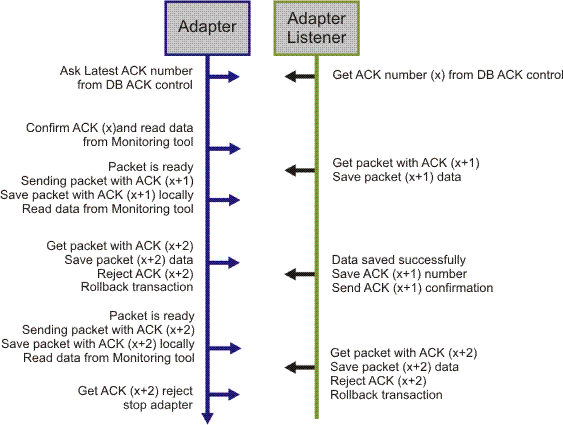
To verify transmission success of data records from the Adapter to the CA Business Service Insight Adapter listener, the Adapter incorporates an ACKs/sliding window algorithm over the TCP/IP layer. This algorithm basically sends the data in packets and then waits for an acknowledgment from the Adapter listener before moving to the next packet. Each packet contains several raw data messages. The number of messages in a packet can be configured by setting the Packet Size parameter. Each packet has a sequence which is contained in the acknowledge message. All relevant parameters that control the process are contained in the CA Business Service Insight interface section of the configuration file. In general however, you do not need to alter these parameters.
The Adapter's Listener writes the raw data in the packet in a single transaction.
Note: The ACK operation can be done only on the raw data messages sent to CA Business Service Insight.
The following figure shows the Adapter communication process.
|
Copyright © 2013 CA.
All rights reserved.
|
|