

A Resource is a physical or logical entity that can change its characteristics over time. It may be allocated to certain service components or contract parties, and so on, at one time, and then be reallocated at some point in the future. Each of these changes or re-allocations are captured by CA Business Service Insight in order to be able to perform calculations at any point in time, based upon resources configuration and allocation at that exact time.
Changes to a Resource or its allocations can be made at any time, but require that a new version of that resource is created. Each new version needs to have an effective date set for it, for when the changes will occur. The changes will then carry forward into the future, unless additional changes are encountered in a later version of that same resource. All changes will only be visible and available for the calculation engine once this new version has been activated and is in effect. This process is called 'Committing' the resource.
Within CA Business Service Insight, there is also a way of handling multiple Resource allocations in one step. This method is via the use of a 'Change Set'. Change Sets allow large volumes of resource changes to be made in a single 'transaction', similar to the way a transactional database works. All the changes can be made to all resources which are allocated to a Change Set by performing the operation on the Change Set as a whole, and then committing the change set in one step.
When dealing with resources and their changes, it is worth considering the following points in relation to the calculation engine:
The previous example addressed a Resource not directly, but by its logical allocation to its function or location (in this case, to its function, a data center server).
The Registration request could be very cumbersome if Events are requested for each individual server held in the data center. One problem is the number of Resources to which are referred. The other is that the infrastructure of the data center changes on a regular basis, so that a server that was a part of the data center may no longer be there, or a new server may be added. Therefore the list needs to be dynamic.
Based on the previous example, it is clear that the Resources need to be attached to a logical group so that they can be addressed via this logical entity. Further, the logical group itself may need management if it is constantly changing.
Resource allocation is the CA Business Service Insight method of tagging Resources. A Resource can be allocated to one or more groups, Resource Types, Contract Parties, or Services. Resource allocations are managed using CA Business Service Insight Version Control.
The Resources available for inclusion in calculations are determined by the resources currently in effect within the system (in relation to the time range being calculated at the time).
Now, returning to the previous example:
Overall number of down-times on data center servers
The data center can be represented in the system as a Service to which is then allocated all servers within the data center. It may also be defined as a Resource Group called "data center servers". These are two alternative methods to choose for the resource allocation in this particular case, but there are more options available.
The following diagram demonstrates to which Entities a Resource may be attached and their logical uses.
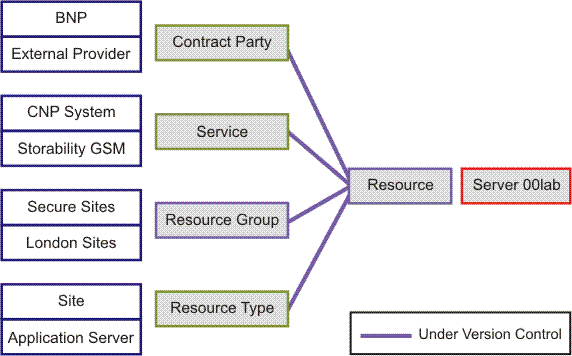
A Resource group can reflect any aspect of the Resource that is required for calculations, such as its location or the technology it contains.
The main purpose of allocating Resources to these entities is to ensure both the correspondence with the calculation requirements and that the model remains as dynamic as possible.
|
Copyright © 2013 CA.
All rights reserved.
|
|