

Understanding the architecture of vSwitch helps you to configure vSwitch as a Service Provider.
The VMware vCenter server provides the central point of control for configuring, provisioning, and managing virtualized IT environments.
When multiple vSwitches are present in the vCenter server, you define network pools for each vSwitch by tagging them to different VLAN IDs.
The following diagram illustrates how the components interact and enable multiple network support for Service Consumers:
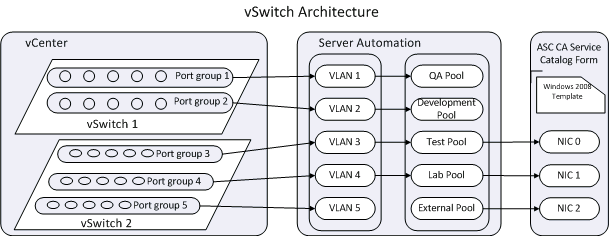
In the vCenter, you configure the vSwitch 1 and vSwitch 2 by creating port groups based on the user requirement. Created VLAN IDs are then tagged to the port groups.
The Service provider defines the network pools in CA Server Automation. For example, as shown in the vSwitch Architecture diagram network pools like QA Pool, Development Pool, and Test Pool are created in CA Server Automation. Each network pool is then associated and tagged to a VLAN ID with a set of IP addresses (IP Pool).
In the Reserve Virtual Machine form, the Service Consumer can select one of the network pools to a Network Interface Card (NIC) associated to the template. This option enables the Service Consumer to select the network when submitting a request.
|
Copyright © 2014 CA.
All rights reserved.
|
|