

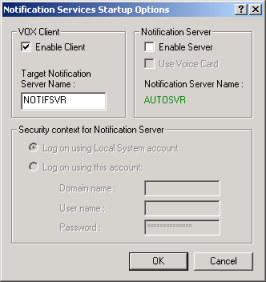
If you plan to use CA Automation Point to automate several systems and expect to use notification capabilities of CA Automation Point intensively, you have the option of using a dedicated notification server for performance optimization. To do so, you would install the CA Automation Point server on two machines, named, for example, AUTOSVR (for automation server) and NOTIFSVR (for notification server). On the automation server, you would configure the Notification Services startup options to disable the notification server, and use NOTIFSVR as the target notification server name for the VOX client.
The following dialog shows how you would do this.
Note: Besides performance optimization, another reason for using a dedicated notification server is proximity to hardware and communication equipment.
|
Copyright © 2014 CA Technologies.
All rights reserved.
|
|