Previous Topic: Web Message ViewerNext Topic: The Web MV Interface


How Web MV Works

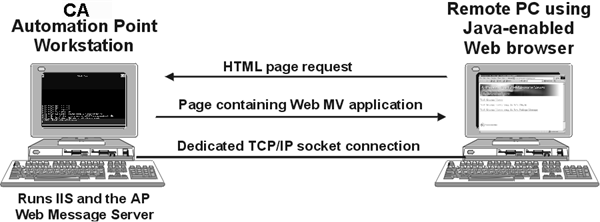
The following illustration shows how Web MV works:

AP--WebMV

  1. You request the Web MV HTML page through the client Web browser.
  2. From this page, you download and launch the Web MV application.
  3. The Web MV application uses TCP/IP to connect to the CA Automation Point server from which it was launched.
  4. You select which CA Automation Point sessions to monitor.
  5. TCP/IP is used to transport both HTML page requests and messages captured from web-enabled CA Automation Point sessions.