

The CA Automation Point Remote Viewer lets you access and control sessions that are running on CA Automation Point workstations at remote sites. Through a TCP/IP connection, the Remote Viewer enables one or more users to simultaneously connect up to 200 sessions from any number of CA Automation Point engines connected to the network. The Remote Viewer is a separately installable client component. It provides session‑level security, logon, and auditing capabilities by mapping sessions to Windows file security.
You can perform the following actions with the Remote Viewer:
The following diagram shows how each remote viewer simultaneously displays sessions from each host.
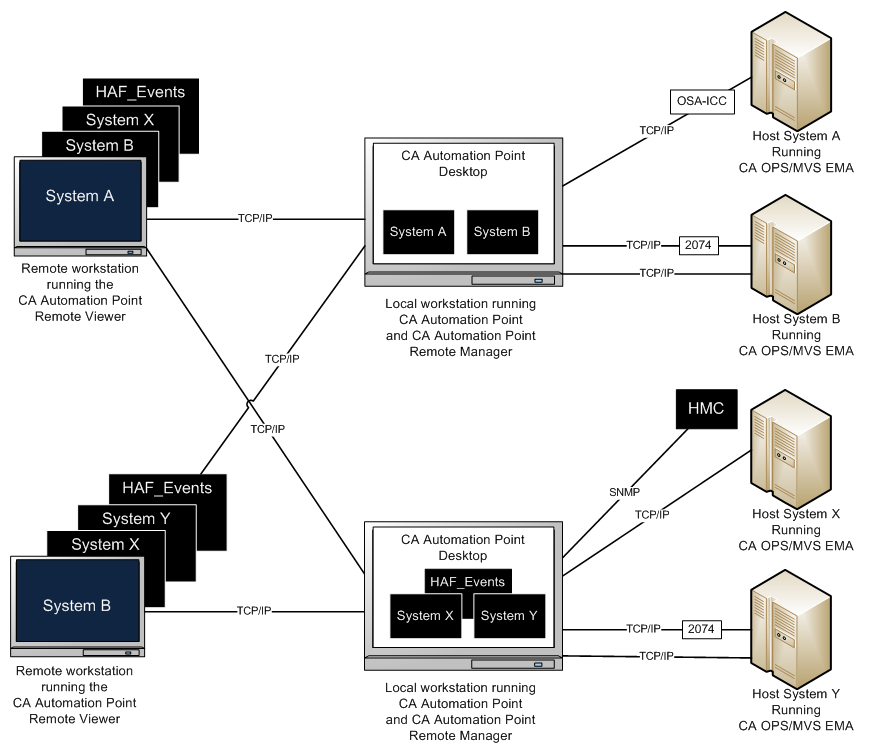
After you are connected to the CA Automation Point Server, you can choose any session or window to view. You can display multiple windows on your remote PC all at one time. Essentially, you can recreate the CA Automation Point server windows that are on a remote machine.
|
Copyright © 2014 CA Technologies.
All rights reserved.
|
|