

Introduction › Overview › Console Consolidation › How Console Consolidation Works
How Console Consolidation Works
Using CA Automation Point, you could respond to the problem of multiple sites as follows:
- Consolidate alerts. Since you typically want to interact with a system in response to a problem, it is inefficient to have to inspect each system for those problems. Collecting the alerts provides a starting point for managing your various systems on a priority basis.
- Coordinate activity across systems. Your order entry system may be tightly tied to your distribution system. Responding to a problem may require interacting quickly with more than one system to address the real problem plaguing your enterprise.
- Use a centrlized notification application. When you need some outside expertise, you typically use your telecommunication facilities to contact an expert - phone, pager, and so on. You should feed problems from all systems into such a notification mechanism, not through a data center that happens to have the connection to your paging service provider.
- Group systems by function or type. Once you have access to all of your enterprise, you can group systems in a fashion meaningful to your site. You can group by a system type (such as z/OS, VAX, or UNIX), or you can group by the function performed (such as all systems involved in your payroll system, or your billing system).
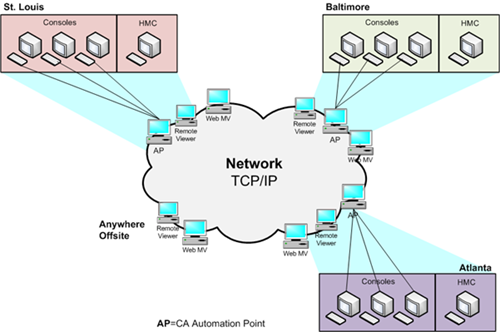
The following illustration shows a sample end result of this console consolidation. (We will revisit this illustration later.)
Copyright © 2014 CA Technologies.
All rights reserved.
|
|