

CA Automation Point keeps customer-modified data separate from CA distributed data so that when a patch or upgrade is run, it leaves the customer-modified data intact. All customer-modified data is kept under the Site files directory. The system-level environment variable %AP_SITE% is populated to point to the current Site directory in use by CA Automation Point.
The Site files reside under their own parent directory in a location independent of the install directory. The CA Automation Point installation program prompts you for a UserData path where all site-specific files are stored. You can accept the default (recommended) or you can choose another directory location. The default has been selected so that many CA Automation Point executables can be run by Standard Users. Under Windows Server 2008 or later, the default UserData path resides under the ProgramData directory. The following diagram shows this new structure:
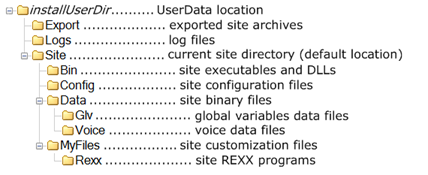
However, the CA Automation Point installation program are not prompt you for a UserData location on upgrades from previous releases. On upgrade installations running on a pre-Windows 2008 operating system, you do not need to move the Site files to a user-writable location because the Windows operating system does not require it.
Note: During an upgrade installation of CA Automation Point, any preexisting files that are found in the Bin\ or Distrib\ (formerly RUNTIME\) directories that are not among the product-distributed files to be installed, are moved into the UserData directory structure. These files are either user files or formerly distributed files that are no longer supported in the current release. You can choose to retain or delete these files under the UserData directory structure.
|
Copyright © 2014 CA Technologies.
All rights reserved.
|
|