

You can filter the messages that you want to view based on their session names. Each Web MV client can choose the list of sessions to monitor by using the following configuration dialog:
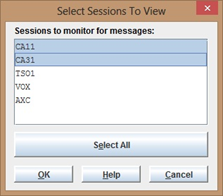
Note: All CA Automation Point messages originating from Web MV-enabled sessions are stored in a relational database for later retrieval. For detailed information about this database and how to select the volume of messages you want to store, see the section Enabling Web MV.
|
Copyright © 2014 CA Technologies.
All rights reserved.
|
|