Monitoring Enterprise Systems › Remote Access › Web Message Viewer › How Web MV Works
How Web MV Works
The following illustration shows how Web MV works:
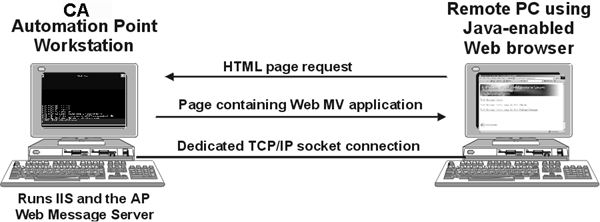
- You request the Web MV HTML page through the client Web browser.
- From this page, you download and launch the Web MV application.
- The Web MV application uses TCP/IP to connect to the CA Automation Point server from which it was launched.
- You select which CA Automation Point sessions to monitor.
- TCP/IP is used to transport both HTML page requests and messages captured from web-enabled CA Automation Point sessions.
|
Copyright © 2012 CA.
All rights reserved.
|
|

