

When a user accesses your online application, you can first log them in and then comprehensively assess them for potential risks by implementing this workflow. This workflow uses device identification information and other factors, such as network information, user information, and (if implemented) transaction information to evaluate users.
Based on the result of the evaluateRisk operation, RiskMinder determines whether to create an association and update the attributes during the postEvaluate operation:
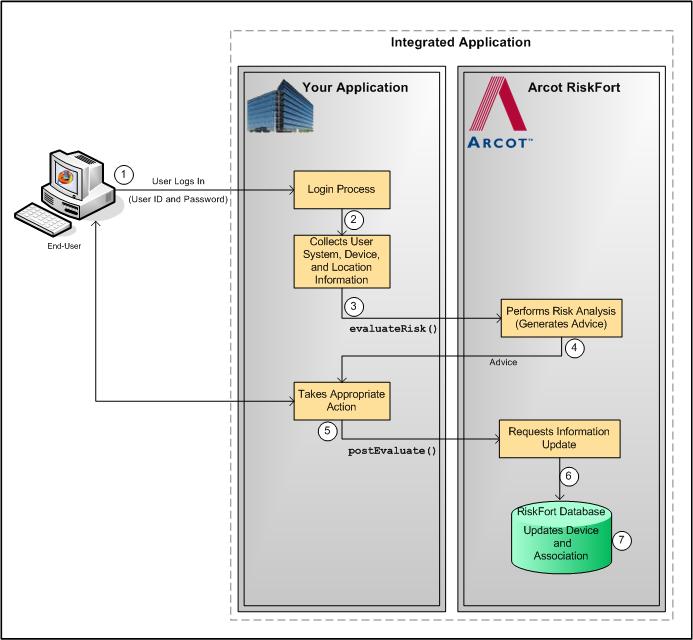
If you call RiskMinder’s risk analysis capability after you authenticate a user in to your online application, then the risk evaluation workflow is as follows:
Your system validates if the user exists in the system. If the user is not valid, then your application must take appropriate action.
Your application collects the following information from the user’s system that will be used by RiskMinder for analyzing the risk:
Your application must call the evaluateRisk operation in RiskFortEvaluateRiskSvc. In this call, you must pass all the user and device information that you collected in Step 2 to RiskMinder.
RiskMinder evaluates the risk using the incoming inputs and the configured rules. Based on the result of rules that were executed and whether the information matched, RiskMinder generates:
If the advice is INCREASEAUTH, then refer to "Secondary Authentication Workflow" for more information on how to proceed.
Based on the result of the evaluateRisk call, your application either allows the user to continue with the transaction, denies them access to the protected resource, or performs secondary authentication.
See "Secondary Authentication Workflow" for more information.
At this stage, your application must call the postEvaluate operation in RiskFortEvaluateRiskSvc. Based on the output generated by the evaluateRisk call, this call helps RiskMinder generate the final advice and update the device and association information.
In this call, you must pass the risk score and advice from the evaluateRisk call, the result of secondary authentication (if the advice in the previous step was INCREASEAUTH), and any association name, if the user specified one.
If any change is detected in the incoming data, RiskMinder updates the data and association information in the RiskMinder database.
The following figure illustrates the post-login risk evaluation workflow.
Post-Login Risk Evaluation Workflow
|
Copyright © 2013 CA.
All rights reserved.
|
|