

When RiskMinder generates the INCREASEAUTH advice, it transfers the control back to your application temporarily for secondary authentication. In this case, your application must implement some mechanism for performing additional authentication. For example, your application can display industry-standard security (or challenge) questions to the user (such as mother’s maiden name and date of birth) or make them undergo out-of-band phone authentication.
After you determine whether the user authenticated successfully or not, you must forward the result to RiskMinder, which uses this feedback to generate the final advice, update device information, create association information, and to store the feedback to use for risk analysis of future transactions.
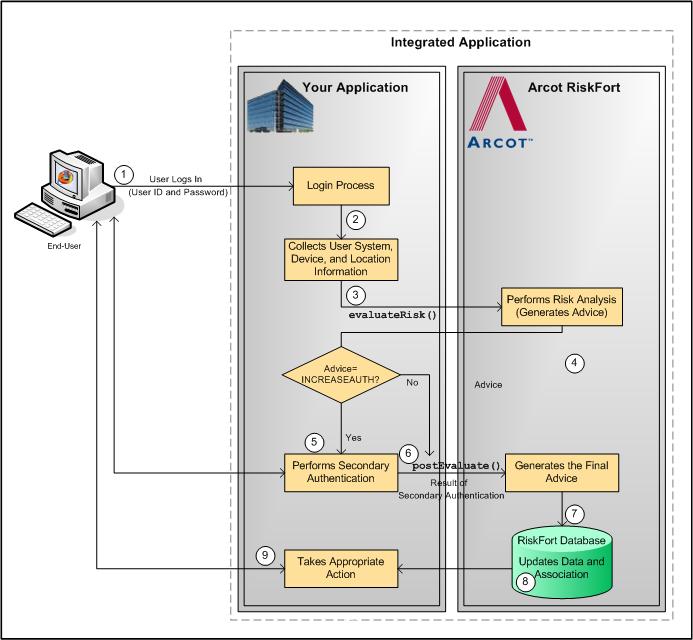
The risk evaluation workflow in case of secondary authentication is as follows:
Your system validates if the user exists in your system. If the user is not valid, then your application must take appropriate action.
At this stage, your application collects information from the user’s system that will be used by RiskMinder for analyzing risk:
At this stage, your application must call the evaluateRisk() function in riskfortAPI. In this call, you must pass all the user and device information that you collected in the preceding step to RiskMinder.
If RiskMinder flags the transaction as suspicious, it generates the INCREASEAUTH advice. This implies that extra credentials are required to help further authenticate the user.
Based on the secondary authentication mechanism that you are using, your application displays appropriate pages to the user. For example, you can prompt the user to:
After receiving user input, your application determines the outcome of the additional authentication.
At this stage, irrespective of the fact whether the user failed or cleared the secondary authentication, your application must pass the result back to RiskMinder. This information helps RiskMinder build an up-to-date and accurate user history.
To do so, your application must call the postEvaluate() function in riskfortAPI. In this call, you must pass the risk score and advice from the evaluateRisk() call, the result of secondary authentication, and any association name, if the user specified one.
By using your application’s feedback regarding the secondary authentication, RiskMinder generates the final advice.
Based on the result of the postEvaluate() call, RiskMinder also updates the device attributes and creates the association information in the RiskMinder database.
Based on the result of the postEvaluate() call, your application either allows the user to continue with the transaction or denies them access to the protected resource.
The following figure illustrates the secondary authentication risk evaluation workflow.
|
Copyright © 2013 CA.
All rights reserved.
|
|