

|
|
|
You can create a Non-Sysplex system registry.
Follow these steps:
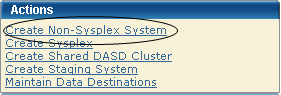
The New Non-Sysplex System dialog appears.
Note: The asterisk indicates that the field is mandatory.
Enter the Non-Sysplex system name.
Limits: Maximum 8 characters.
Note: Sysplex and Non-Sysplex systems can have the same name. Use the Description field to differentiate between these systems.
Enter the description.
Limits: Maximum 255 characters.
Enter the CCI system ID.
Limits: Maximum 8 characters.
The Non-Sysplex System is saved, and its name appears in the Non-Sysplex System list on the left.
Note: To withdraw this create request, click Cancel
Note: z/OS systems running under VM are treated as being in basic mode and not LPAR mode. As a result, the LPAR number is null in the z/OS control block. When the LPAR number is null, the system validation output shows the following:
Property Name: z/OS LPAR Name, Value: ** Not Applicable **.
| Copyright © 2011 CA. All rights reserved. | Tell Technical Publications how we can improve this information |