

Administration › Monitoring with a NI GigaStor › Add a NI GigaStor Monitoring Device › Install Alarm Notification Manager on the User's Computer
Install Alarm Notification Manager on the User's Computer
To enable a management console user to open a packet capture investigation on a NI GigaStor, the following software components must be installed on the user’s computer:
- Alarm Notification Manager. Alarm Notification Manager with NI GigaStor extends global application response-time monitoring from CA Application Delivery Analysis to provide drill-down into packet-level data for root-cause analysis.
Alarm Notification Manager must be able to communicate with the NI GigaStor on TCP-25901 through TCP-25903. For more information about installing and licensing Alarm Notification Manager on the management console computer, contact your NI GigaStor administrator. Unlike the Connector for Alarm Notification Manager, the user cannot install Alarm Notification Manager from the management console.
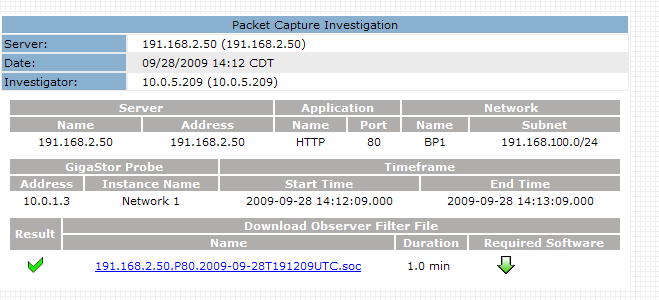
- Alarm Notification Manager Connector. When a management console user attempts to open a packet capture investigation on a NI GigaStor for the first time, the Packet Capture Investigation report displays a link that prompts you to install the Alarm Notification Manager Connector.
Under Required Software, click the down arrow link to run the Connector setup program.
Copyright © 2015 CA Technologies.
All rights reserved.
|
|