

Click Refresh to display the currently detected networks, servers, and applications. The Configuration Utility does not automatically refresh the list.
The color-coded list of entries indicates the status of the application, server, and network entries. In the example below, the traffic is not monitored by CA ADA.
Important! If the Bytes From or Bytes To column is 0, this can indicate a problem with how the TCP packets are mirrored from the switch port.
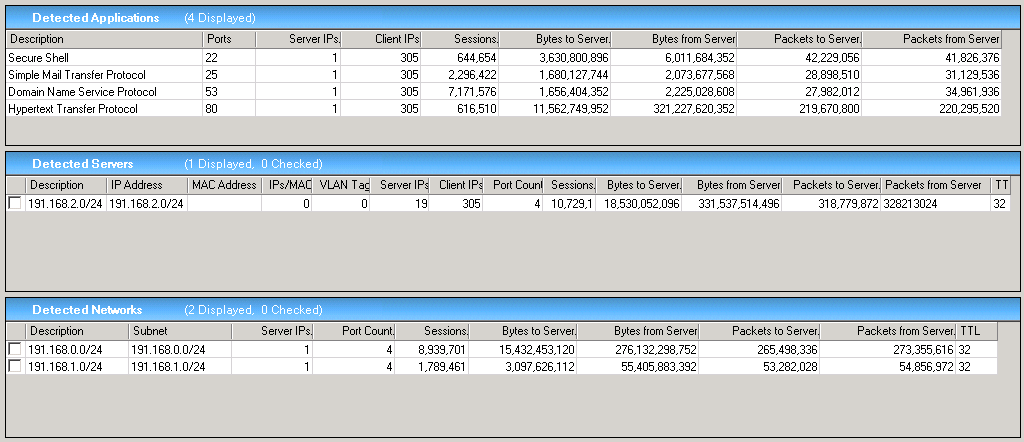
A status of:
Indicates that the Configuration Utility detects the entry on the monitoring device or packet capture file, but there is no definition for the entry in the Configuration Utility or the management console. Use the Configuration Utility to configure a definition for the entry.
Indicates that a definition for the entry exists in CA ADA. To edit the server or network definition, use the CA ADA management console.
Indicates that a definition for the entry exists in the Configuration Utility but not in the management console. Use the Configuration Utility to edit the definition for the entry.
Note that if an unconfigured server communicates on the same port as a configured (green) application, the application port appears twice, both as a configured (green) and unconfigured (black) entry. Sort the list of Detected Applications by Port to find any duplicate port entries.
|
Copyright © 2015 CA Technologies.
All rights reserved.
|
|