

A management console can typically support all the Cisco WAE devices in your environment. However, if your WAAS deployment optimizes an application that requires you to deploy more Cisco WAE monitoring devices than can be supported by a single management console, share the Client, WAN, and Server segment application performance data for your remote sites between more than one management console.
In the example below, sharing WAN-optimized application performance data enables the management console on the right to report the Client segment for App A and App B segment traffic between Branch X and WAE x. Without sharing, the management console on the right would only report the WAN and Server segments for App A and App B on Branch X.
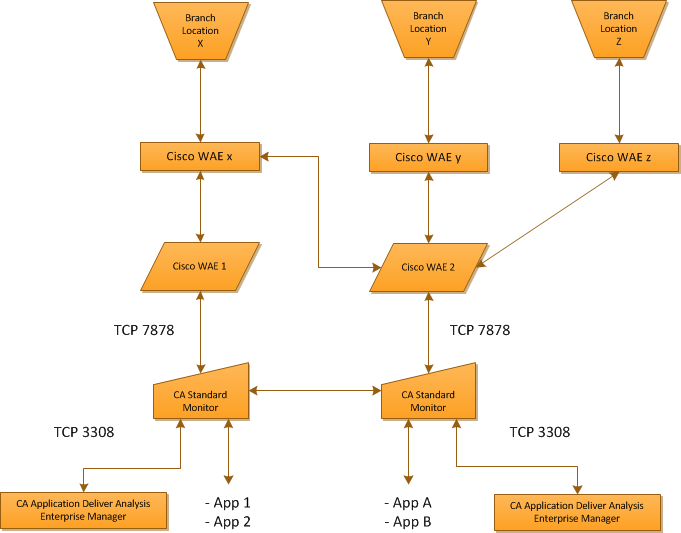
Alternatively, if you configure the management console on the left to monitor the performance of App A and App B across your remote branches, sharing WAN-optimized application performance data enables the console to report the WAN and Server segments for App A and App B on Branch X, plus the Client, WAN and Server segments for App A and App B on Branch Y and Branch Z. Without sharing, the management console on the left would not report the WAN and Server segments for App A and App B on Branch X, or Branch Y and Branch Z.
The management console shares packet digest files from Cisco WAE devices between more than one management console by polling each management console for its list of CA Standard Monitor and CA Multi-Port Monitor monitoring devices, and then sharing packet digest files with a monitor that belongs to the shared Console. For example, if a CA Standard Monitor receives packet digest files for a server that it is not supposed to monitor, the monitor shares the packet digest files with a monitor that belongs to a shared management console. To minimize the amount of data that is shared, monitor an application from the management console that owns the monitor that is closest to the application.
|
Copyright © 2015 CA Technologies.
All rights reserved.
|
|