

To enable a management console user to quickly analyze and respond to performance issues at a remote site, create client networks that correspond to the actual client networks in your environment.
If you want to enable the management console to report the actual client IPv4-based IP addresses that communicate with an application, the client networks must have at least a 24 bit subnet mask.
If necessary, you can convert a large client network into smaller network regions so that the management console can report the observed TCP traffic by region. A network region is a smaller subnet of a client network. For example, if you have /22 client network, convert it into four /24 network regions.
|
If the network is defined as a |
Create this many regions |
|---|---|
|
/24 |
1 |
|
/23 |
2 |
|
/22 |
4 |
|
/21 |
8 |
|
/20 |
16 |
|
/19 |
32 |
|
/18 |
64 |
|
/17 |
128 |
|
/16 |
256 |
When you convert a client network into regions, the management console reports the observed TCP traffic by region, rather than by the defined client network. Continuing the previous example, after you convert the /22 client network into /24 network regions, the /22 client network is only visible from the Administration page and is not available for reporting purposes. In reports, you would need to look for the individual network regions instead.
To enable a management console user to report on application performance across a defined client network rather than on the observed traffic for a particular /24 network region, use the CA PC or the CA NPC to create a group of all the network regions.
To easily identify the network regions that correspond to a client network, use a familiar naming convention. In the example below, the Austin group includes the /24 network regions that are converted from the 192.168.0.0/22 client network.
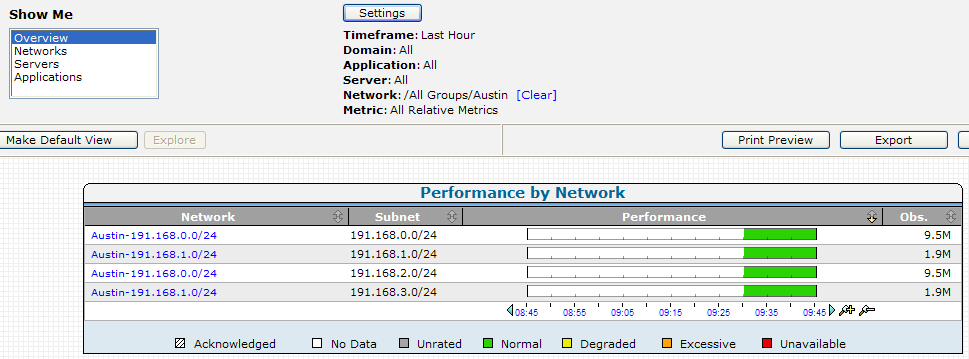
When reporting on a group of network regions, the performance detail reports on the Engineering page, such as the Response Time Composition: Average report, aggregate data from all the /24 network regions. However, all other reports, such as the Operations page reports and the Engineering page performance maps, list each /24 network region separately. For information about reporting on a group of networks, see the User Guide.
The following table shows some sample network configurations with network regions.
|
Network Configuration |
/24 Network Regions |
|---|---|
|
Name: ABC |
10.10.1.0 |
|
Name: DEF |
10.10.0.0 |
|
Name: XYZ |
10.10.0.0 |
|
Copyright © 2015 CA Technologies.
All rights reserved.
|
|