

VACL capture allows for multiple ports to be configured as capture ports. Use this configuration to send captured data to multiple monitoring devices. For example, you can send a copy of all traffic to GigaStor and another copy to an IDS system. Configure a monitor session when you use VACLs to filter traffic and you need an unfiltered copy of the traffic for an IDS or probe.
When configuring capture ports, use the following command, which provides several options:
Router(config-if)# switchport capture allowed vlan {add | all | except | remove} vlan_list
Instructs the switch to send captured traffic from all VLANs out of the capture port.
Specifies which VLANs to send out of a capture port. Use this command when the volume of the captured traffic is too large to buffer and send on one interface. To determine whether this situation is occurring, monitor the capture port for discards over time using an SNMP poller.
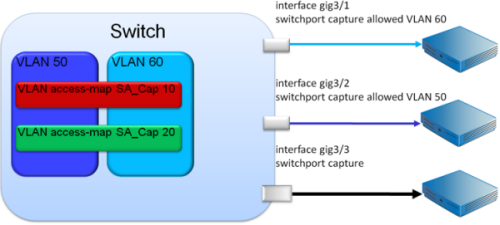
The preceding diagram shows how traffic is captured and filtered from VLANs 50 and 60. Three capture ports are configured, one to accept only VLAN 50, one to accept only VLAN 60, and a third to accept both VLANS.
Tip: Connect the first two capture ports to Application Delivery Analysis collection devices to reduce the risk of discards at the switch port and to prevent overloading of the Application Delivery Analysis server. Connect the third capture port to a device that does not need every packet to compute its metrics. For example, devices that use sampling techniques, such as EMC Application Discovery Monitor or certain IDS solutions.
|
Copyright © 2015 CA Technologies.
All rights reserved.
|
|